
Wanderburg: Who Is the User on Top of the Leaderboard
- Reviewed
- Scope
- Dated evidence; no installed-build testing
At the October 3, 2026, 15:47 UTC snapshot, DF1GoldGlobal's number-one player was Tjors with 920,472. The other eight public Steam boards had their own leaders; Tjors was not identified as an overall game-wide champion. To answer who is on top of the leaderboard you are viewing, match its exact board name and check the first page, rather than treating every ranking screen as the same list.
The table below preserves the public Steam usernames and displayed scores from that snapshot. Rankings can change after the observation. The matching Shanghai time was October 3 at 23:47, and the included screenshot was taken at 15:48 UTC, or 23:48 Shanghai time, on the same date.
First place and the top three on each public board
The public selector exposed nine boards, using the raw names below. Each one was read separately. Names and scores belong to their own row; a score copied from another board is not a replacement for the first-place entry on the board you selected.
| Public board name | First place and score | Second place and score | Third place and score |
|---|---|---|---|
| DF1GoldGlobal | Tjors — 920,472 | connor143 — 849,026 | LIBƎRAT☯ R — 758,051 |
| DF2GoldGlobal | 华夏龍 — 996,060 | connor143 — 717,303 | III — 674,569 |
| DF3GoldGlobal | Hanekawa Hasumi_ — 812,393 | SRODICA — 779,859 | Callsign Aura — 776,626 |
| DS1GoldGlobal | CHUCK BR — 1,722,016 | MoFongo — 973,215 | WARLORD_Sanctum — 920,602 |
| DS2GoldGlobal | 751036251 — 1,346,701 | TeflonDon — 857,312 | DerHani — 650,130 |
| DS3GoldGlobal | RocketMan Dan — 1,849,355 | ShiiZo — 969,758 | Akivatoo — 931,602 |
| GL1GoldGlobal | Pustekuchen — 2,285,352 | III — 1,121,036 | Tyshca (Rob) — 943,201 |
| GL2GoldGlobal | CHUCK BR — 982,476 | TeflonDon — 894,904 | shhhmokee — 845,301 |
| GL3GoldGlobal | Cong_Cong3 — 1,166,242 | CHUCK BR — 1,150,083 | Njörd — 952,496 |
These are public account display names, not real-world identities. The names include punctuation, spaces, underscores, special characters and a Chinese-language username. Keep that spelling when checking an entry. Changing a name to an approximate English spelling can make it harder to match the player shown on Steam.
The table also helps explain a familiar source of confusion. CHUCK BR led both DS1GoldGlobal and GL2GoldGlobal in this snapshot and appeared second on GL3GoldGlobal. Those are separate placements, not contradictory records. Likewise, connor143 appeared second on both DF1GoldGlobal and DF2GoldGlobal with different displayed scores. The board name supplies the context that a player name alone cannot provide.
No combined overall board appeared in the public selector. The raw labels DF, DS and GL are retained here without expanding them into biome or difficulty names. An undocumented abbreviation should not become a confident label in a guide, and the word Gold in an internal board name does not provide a complete scoring formula by itself.
Read the public Steam board correctly
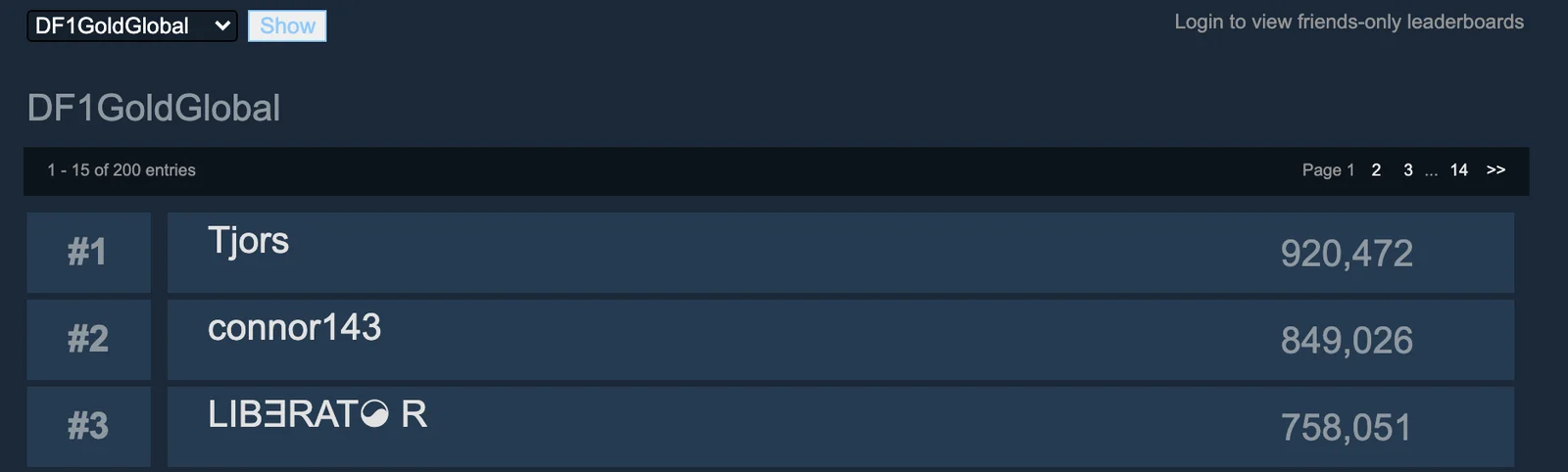
DF1GoldGlobal on October 3, 2026 at 15:48 UTC. This is a dated example of the public Steam board.
The screenshot shows the public Steam webpage for DF1GoldGlobal, including its selector, board name and first three entries. It is a dated webpage example, not a screenshot of Wanderburg's in-game interface. The first row shows Tjors, followed by connor143 and LIBƎRAT☯ R in the October 3 capture.
Several visible controls answer different questions. The board selector chooses which ranking list to display. The Show button applies that choice. The row's rank identifies its position on the current list, while the name identifies the displayed account and the number is the score shown by Steam.
A page number is different from a rank. Page one contains the leading entries; moving to another page takes you farther down the displayed list. In the captured public view, the first page reported entries one through fifteen out of two hundred, with navigation to later pages. That count describes this public display. It should not be turned into a claim that only two hundred people own or play Wanderburg.
The screenshot contains a prompt to log in for friends-only leaderboards. That prompt does not mean the visible global list is inaccessible: the displayed public ranks were available without signing in. Use the prompt only if your task is viewing a friends-only comparison, rather than mistaking it for an error preventing all ranking access.
Select the board before naming its leader
Use this sequence when you want to check a current first-place username on the public Steam page:
- Search for "Wanderburg Steam Global Leaderboards" and open the Steam Community result for app 3624140. Confirm that the page identifies Wanderburg and displays a leaderboard selector.
- Read the board currently shown beneath the selector. The base view opened DF1GoldGlobal during this snapshot, so opening it alone did not select every board at once.
- Choose the exact board name you want in the selector. Compare the complete name, including its number and GoldGlobal suffix.
- Select Show to load that board's ranking list.
- Confirm that the displayed heading matches the board you selected. Do not copy a result while the page still identifies a different list.
- Return to the first page and read the row marked number one. Record the displayed username and score together.
- Record when you checked it. If you share the result, include the board name as part of the answer rather than only the player's name.
The expected result is a specific statement: a named public account was first on a named board at a stated time. That is more useful than “this person is the best player,” which would require a different kind of comparison. It also makes a later change easy to understand: the new observation can be checked against the same board, rather than against an unrelated screenshot.
When your own screen shows a different leader, start by checking the selected board and page. If those match, compare the observation time. The table is a fixed October 3 snapshot, so a later public ranking does not need to reproduce it. A player moving into first place after the capture is a change in the live list, not a reason to substitute another board's result.
Identify the account without inventing a player biography
Clicking a public player name on the captured webpage leads to that account's Wanderburg statistics page. The portrait also identifies a linked Steam profile. Use the actual entry when following an account; searching a similar name elsewhere is a different identification step.
A displayed username does not establish a person's country, nationality, streaming channel or real name. A Chinese-language label such as 华夏龍 should remain the displayed label, and a numeric label such as 751036251 should not be interpreted as a published personal identifier. The board answers who is displayed at that rank; it does not supply a biography.
This also matters when comparing the table with a video claiming a number-one run. A title describing a first-place result can be about a historical attempt. To connect that attempt with a current Steam entry, you would need the matching board and account context. The phrase “number one” alone does not establish that it refers to DF1GoldGlobal or to the moment captured here.
For the gameplay behind a particular configuration, use the Turrets and Arrows build guide. For a broader choice of ordinary setups, use Best Build. This page identifies and reads rankings; those guides explain how to play the builds without inventing a scoring rule from a leaderboard label.
Hide the in-game leaderboard display
Wanderburg's 0.9.13 update added an option to hide the leaderboard on the start screen, biome interface and end screen. The option can be reached through settings or directly at the leaderboard. This is the relevant feature if your goal is removing the ranking display from those screens.
Use the control on the screen you are trying to change, then check whether the leaderboard is still shown there. Do not assume that a hidden panel means your account has been deleted from a public board. Visibility is an interface choice; this update does not describe it as a command for removing submitted records.
Keep the public webpage's friends-login prompt separate from the game's hide option. One concerns a Steam viewing context, while the other concerns where Wanderburg presents its leaderboard interface. Changing an in-game display option is not a documented way to log in to the public webpage or select one of its nine board names.
If your installation does not expose the documented option, check the game version before looking for an invented menu path. The relevant change was added in 0.9.13, so instructions or screenshots from earlier versions may not show it. No additional hidden switch is established here.
Separate loading failures from rank changes
The 0.9.14 update improved leaderboard loading robustness. That is a concrete patch change to consider when an in-game list fails to appear. It does not establish that every loading failure is fixed, nor does it say that a changed first-place name is a loading error.
Describe the observed problem precisely. An empty panel, an unavailable friends view, a different selected board and a changed score are different observations. Write down the game patch and the screen involved for a game loading issue; write down the raw board name and time for a public ranking comparison.
If you use Damage Stats, follow its documented Steam launch route. The mod author reported that launching the game executable directly failed to initialize Steamworks correctly in their test and stopped statistics and leaderboard updates for that run. That is an author-reported setup issue, not a universal explanation for every missing score. The Mods installation guide explains that plugin's launch and compatibility requirements.
Score validation and fair comparisons
The 0.9.13 update added a score legitimacy checker intended to prevent cheating. It establishes that the game includes such a check, but it does not publish a ban policy, a list of detection conditions or a method for calculating each public board's score.
A high displayed score is not, by itself, proof of cheating. Conversely, being visible on a public board is not a published guarantee about every action taken during the run. Avoid assigning explanations to a particular account when the entry supplies only a name, rank and number.
This guide does not describe score manipulation, bypasses or ways to submit altered results. Gameplay-changing software is discussed separately in the Trainer guide, where provider compatibility and personal experiments are kept distinct from normal ranking claims. An informational overlay also does not supply an undocumented scoring formula merely because it measures damage.
Preserve enough context for a useful comparison
When recording a ranking for yourself, capture the board heading and the relevant row together. Include the selected board, displayed rank, exact username, displayed score and observation time. Those fields are sufficient to explain what the screen said without adding a guessed location, run duration or calculation.
For a changing leaderboard, a screenshot with only a player name loses the key context. A screenshot with only a score loses the account and board. The example above keeps the selector and board heading with the first three rows so the identity claim remains attached to its ranking list.
If you return later, compare the same fields on the same board. Keep the earlier observation dated rather than overwriting it in your notes as though it had always shown the new result. That gives you a useful record of what changed while leaving build performance, scoring mechanics and account identity claims within the information the game actually supplies.