
Wanderburg Performance: Low FPS and Stutter Checks
- Reviewed
- Scope
- Dated evidence; no installed-build testing
For better Wanderburg performance, finish available game updates and compare the same kind of gameplay before changing several settings. Hotfix 0.9.13 addressed performance after the game was left idle; 0.9.14 introduced a 240 FPS ceiling in the main menu and overworld. Neither announcement promises a particular frame rate during combat. Start by identifying whether your problem is persistent low FPS, brief stuttering, or a slowdown that appears only after a long run or pause.
If Wanderburg exits, freezes completely, or cannot launch, use the crash troubleshooting guide. This page addresses a game that remains running but does not feel smooth. A castle that is hard to steer with otherwise smooth animation may instead need the controller setup checks.
If the game stays responsive but shadows stretch or black graphics artifacts appear, see the shadow artifact reporting guide. That page records the evidence limits for this visual symptom; it does not claim a verified game-specific fix.
Match the performance symptom to a useful comparison
The moment a problem begins matters more than a general description such as bad optimization. A consistently slow opening, a hitch when many attacks appear, and a rough return from a long pause give you different things to compare. You do not need to name the cause before recording the behavior.
| Observed behavior | First comparison | Useful detail to keep |
|---|---|---|
| Low FPS from the beginning of a run | Fresh launch with the same resolution and familiar equipment | Whether menus and overworld are also slow |
| Intermittent stutter during combat | Similar encounters before and after the stutter begins | Visible effects, approximate run stage and whether controls still respond |
| Smooth opening followed by late-run slowdown | Opening and late sections of the same session | Equipment, elapsed play time and change in enemy density |
| Stutter after leaving the game idle | Before pausing and immediately after resuming | Approximate idle duration and installed game version |
| High FPS in menus but lower FPS in combat | Compare each scene separately | Which scene the number describes |
Keep the observation literal. Brief pauses in animation can be recorded as stutter even when an average FPS number looks acceptable. Conversely, a lower but steady frame rate does not establish the same fault as a repeated hitch. If you have a frame-rate display available, record its reading alongside the visible symptom; this guide does not require an undocumented in-game monitoring switch.
Do not change the captain, equipment, resolution and launch mode together and then attribute the result to one of them. Wanderburg runs can present different situations, so even a careful comparison needs a note about what changed naturally between attempts.
Establish the installed version before copying an old fix
The latest explicitly numbered announcement reviewed for this guide is hotfix 0.9.14, published September 21, 2026. A dated announcement is not proof of the version currently installed on your machine. Allow Steam to finish available downloads and installation work, then record the version information exposed by your own game or client before repeating a troublesome sequence.
This matters particularly for reports written during the first days of Early Access. A player describing a problem in 0.9.10 or 0.9.11 was not testing the later idle-performance change in 0.9.13. Their observation can suggest a useful reproduction sequence, but it cannot establish that the same problem persists unchanged in your installed version.
Use the patch history below to choose the matching comparison. Ground-fire effects, time spent idle, graphics API behavior and menu frame rates are separate subjects. Installing an update that mentions one of them does not demonstrate that every source of slowdown has been corrected.
| Update | Announced performance change | Practical implication |
|---|---|---|
| 0.9.6 | Ground Fire performance improved | Date older observations involving fire effects before comparing them |
| 0.9.7 | Graphics API priority changed to improve performance and reduce crashes | Old launch behavior may differ from an updated installation |
| 0.9.13 | Performance improved while the game is left idle | Retest a pause-and-resume symptom on your system |
| 0.9.14 | Main menu and overworld limited to 240 FPS | Treat the limit as a ceiling for those scenes |
A completed update is a sensible baseline, not a guaranteed solution. If the same symptom remains afterward, preserve that result and continue with the relevant comparison instead of repeatedly reinstalling or describing the update as ineffective for every player.
Read the 240 FPS limit correctly
The 0.9.14 change names the main menu and overworld. It does not describe a universal combat limit, a minimum frame rate, or a performance target that every PC should reach. Seeing fewer than 240 frames per second is therefore not evidence that the update failed.
Likewise, reaching the ceiling in a menu does not establish how a crowded run will behave. Menus, overworld navigation and combat represent different scenes. Write down which one you are measuring so a high menu reading is not mistaken for a gameplay benchmark.
If your complaint concerns a late fight, compare late fights rather than the menu before launch. If the menu feels different after updating, record that separately from combat. Combining both observations into one average makes it harder to identify the change you actually care about.
There is no verified universal graphics preset or target FPS for the hardware combinations covered here. A useful result is a repeatable improvement in the same symptom, with the tested resolution and configuration recorded. It does not need to equal the menu ceiling to count as an improvement on your machine.
Retest stuttering after a long pause
An Early Access player report covering versions 0.9.10–0.9.11 described severe stuttering after an ongoing level was paused with Escape for approximately five to ten minutes. The player reported that the symptom went away after enemies and the boss were cleared. This is a specific historical observation, not a diagnosis for every paused run.
Hotfix 0.9.13 subsequently announced an idle-performance improvement and specifically invited players to check whether it worked on their systems. That makes a controlled pause-and-resume check more relevant than assuming the older report still describes your installation.
- Begin with a fresh launch and note the installed version.
- Use familiar equipment and a stage where you can observe movement and attacks comfortably.
- Record whether the run already stutters before the pause.
- Pause and note approximately how long the game remains idle.
- Resume and describe the first visible change, if any.
- Note whether smoothness returns as the encounter changes, without claiming that clearing enemies is a proven repair.
Repeat only as far as necessary to establish a clear example. If the opening already stutters, a rough return from pause does not isolate an idle-specific problem. If a long pause produces no change, record that outcome rather than forcing your experience to match the earlier report.
Do not infer a memory leak from elapsed time alone. The same visible slowdown can require different explanations, and the patch wording does not identify a universal underlying cause. The actionable information is the version, duration and sequence you can reproduce.
Keep minimum requirements separate from FPS expectations
The Steam listing specifies the following Windows minimum requirements. These are installation and hardware requirements; they are not benchmark results or a promise of a particular resolution, frame rate or late-run experience.
| Component | Listed minimum |
|---|---|
| Processor and operating system | 64-bit |
| Operating system | Windows 10 or higher |
| Processor | Intel Core i5, 10th Generation |
| Memory | 4 GB RAM |
| Graphics | Nvidia GeForce GTX 1660 Ti |
| DirectX | Version 11 |
| Available storage | 2 GB |
The reviewed recommended section specifies a 64-bit processor and operating system plus DirectX 12. It does not provide a separate recommended CPU, RAM or graphics-card model. Do not turn those blank fields into a higher hardware specification copied from an unrelated game.
The DirectX requirement also does not establish a guaranteed best launch choice for every GPU. The developer has changed graphics API priority and documented launch alternatives, but a driver, operating system or hardware combination still needs its own observed result. The detailed supported launch-choice procedure belongs to the crash guide, especially when instability accompanies the performance complaint.
Record your actual CPU, GPU, memory and resolution when sharing a performance result. Saying that a PC meets minimum requirements gives less information than naming the components and the scene where the issue occurs. It also avoids treating two different machines as if they had undergone the same test.
Compare a crowded run without changing its purpose
Late-run observations are useful when they identify a transition: movement was smooth earlier, then combat became uneven as a particular encounter developed. Keep the stage, equipment and visible effects in the description. They are context for investigation, not proof that a named module is responsible.
A comparison between a quiet opening and crowded combat naturally changes several things. It can show when the problem becomes noticeable, but it cannot by itself isolate the rendering cost of one weapon or the exact number of enemies at which a fault begins. Avoid assigning a numerical threshold that you have not measured.
If you use another familiar loadout for comparison, state that it is a different run. Keep the same resolution and other known configuration where practical. A smoother result can be worth recording while still leaving open whether equipment, encounter composition or another difference contributed.
The Overtime survival guide covers movement, recovery and gameplay decisions. Losing health because enemies survive longer is not automatically a technical FPS problem. Keep the two observations separate so a change in damage output does not become an unsupported optimization claim.
Interpret hardware-specific reports at their actual scope
One launch-day review reported rarely falling below 100 FPS at 2560 × 1440 on a SteamOS Steam Machine using Proton 11, within the sections the reviewer had unlocked. That is a result on a named setup and limited progression, not a benchmark performed by this site or a promise for Windows, Steam Deck or every late encounter.
If your hardware or software differs, the number is not a direct pass-or-fail target. Even on a similar setup, the run stage and equipment remain relevant. Compare a report's operating system, compatibility layer, resolution and gameplay coverage before using its frame rate as a reference.
Steam Deck's Playable label answers a compatibility question rather than setting an FPS floor. The platform availability guide covers that distinction along with PC and console availability. A controller-support label likewise does not establish performance on a particular handheld.
Track ongoing improvements and report the unresolved case
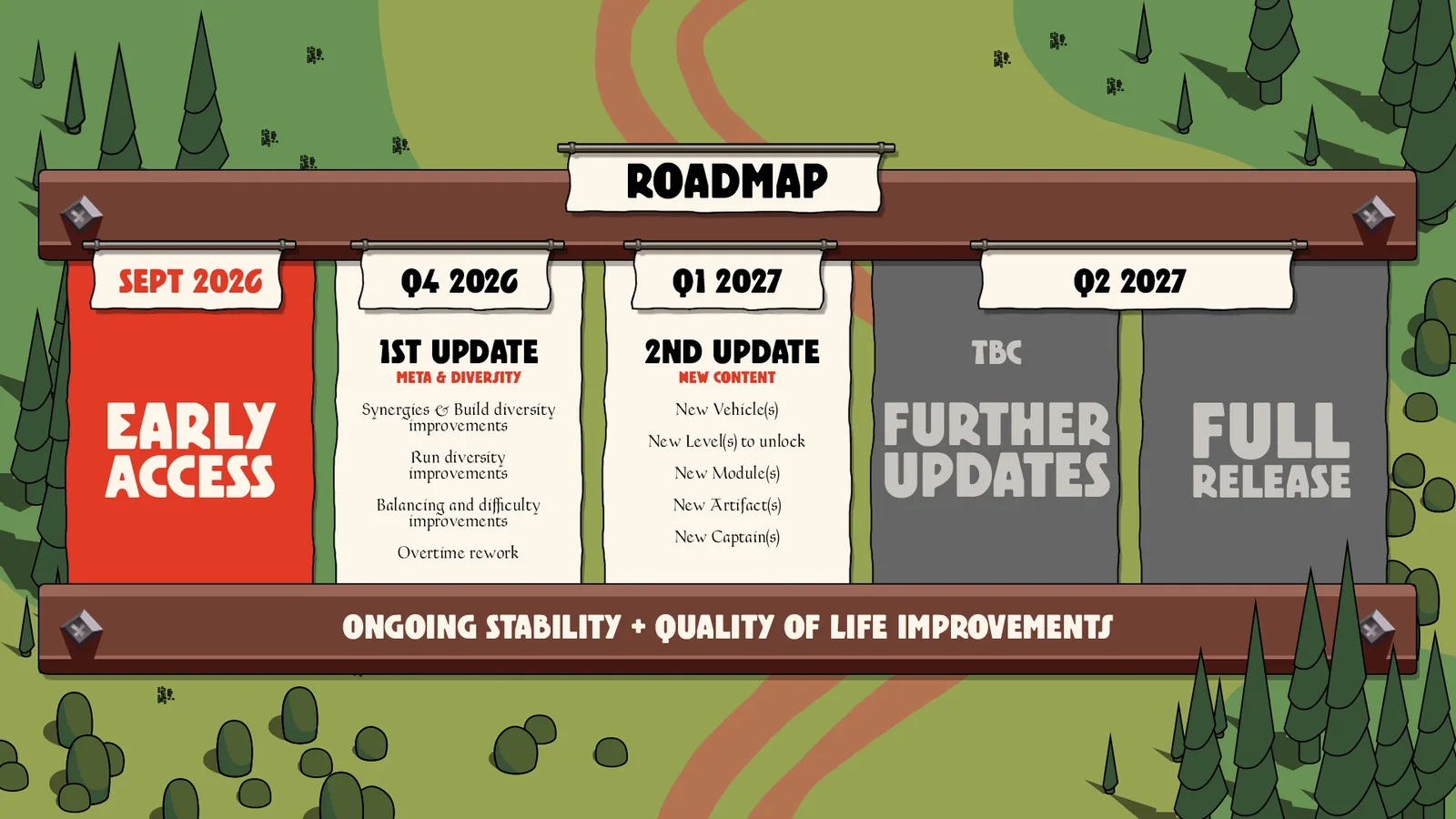
The September 30 roadmap identifies performance and stability as continuing priorities alongside the planned content updates. The graphic is a development plan, not evidence that an unresolved symptom has already been fixed. Its ongoing-improvements note gives context for reporting a reproducible case during Early Access.
A useful report can remain short. Include the installed version, operating system, CPU, GPU, driver version and resolution. Describe the scene, equipment and action immediately before the slowdown. For an idle issue, add the approximate pause duration; for a late-run issue, add when the transition became noticeable.
List the comparisons you actually completed and their outcomes. A fresh launch that stays smooth for a short opening does not prove a late-run problem solved. A pause test that fails to reproduce stutter is useful negative evidence. An update that changes one scene but leaves another rough is a partial result worth describing precisely.
When sharing a capture, choose a sequence that shows the transition or repeated hitch rather than only a still image of a busy battlefield. Keep the configuration that produced it recorded. This gives the developer a concrete case to investigate and gives you a baseline against which a later update can be compared.