
Wanderburg Trainer: Cheats, WeMod and Cheat Engine Tables
- Reviewed
- Scope
- Dated evidence; no installed-build testing
Wanderburg has a WeMod trainer for the Steam game on Windows, with ten listed options covering health, cooldowns, Nitro, currency, damage, timing and movement. Choose the tool by the change you want, then check its support for your installed game version before enabling anything. A March 2026 Cheat Engine table targets the old demo; it is not a verified table for the current Early Access game.
This guide covers gameplay changes for personal experiments. If you want to measure normal weapon damage without changing combat values, use the Damage Stats mod guide instead. For ordinary progression without tools, follow Silver farming.
Choose a trainer, a table or an information overlay
A search for Wanderburg cheats can lead to three different kinds of software. An app-based trainer offers named options inside its own client. A Cheat Engine table is a separately authored table for Cheat Engine. Damage Stats is an informational plugin that reads damage counters and estimates upgrade choices.
| Your goal | Relevant tool | What to check before proceeding |
|---|---|---|
| Change health, ability waiting times or movement conditions | A Wanderburg trainer listing | The provider, Steam support and the supported game version |
| Use a specific Cheat Engine table | A table with a named author and stated game version | Whether it targets the demo or the paid Early Access release |
| See which weapons contribute damage in a normal run | Damage Stats | Its BepInEx requirement and author-stated compatibility |
| Learn a reproducible build without altered values | A normal build guide | The required modules and the patch covered by the guide |
A trainer advertising ten options is not automatically a ten-entry Cheat Engine table. Likewise, a page using the word “mods” does not necessarily contain installable community plugins. Read the actual tool name and workflow before choosing a download. The distinction matters because each tool has its own setup, compatibility checks and definition of success.
The ten listed WeMod options
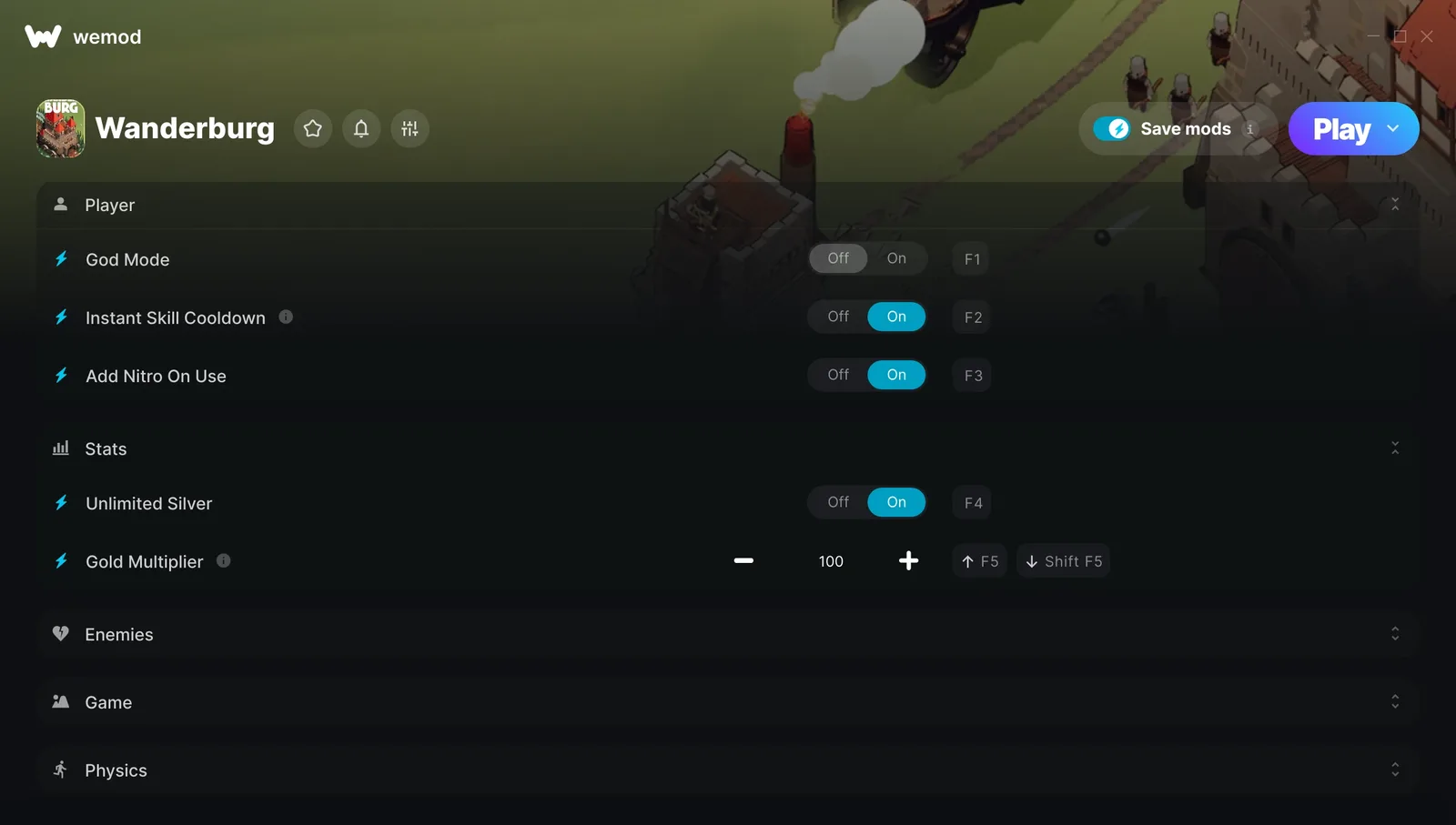
The WeMod Wanderburg listing identifies Steam as its game platform and Windows as the client operating system. Its ten options are grouped by the part of the run they affect. The following map helps you identify the relevant control; it does not prescribe multiplier values.
| Group | Listed option | What the label concerns |
|---|---|---|
| Player | God Mode | Health and receiving damage |
| Player | Instant Skill Cooldown | The waiting period before skills can be used again |
| Player | Add Nitro On Use | Nitro availability when using it |
| Stats | Unlimited Silver | Silver rather than the separate gold multiplier |
| Stats | Gold Multiplier | A multiplier associated with gold |
| Enemies | Instant Kill | Killing enemies rather than changing your own health |
| Enemies | Damage Multiplier | Damage output rather than the ability recharge timer |
| Game | Stop Wave Timer | Wave timing |
| Game | Game Speed | The speed of the game rather than only castle movement |
| Physics | Movement Speed Multiplier | Castle movement speed rather than the entire game clock |
The interface illustration shows player controls and the currency group, with other categories collapsed. Its displayed switch positions and multiplier value are an example of that interface, not a recommended setup. Use the labels visible in your installed client, since a provider can change the arrangement or bindings.
Do not treat similarly worded options as interchangeable. Game Speed and Movement Speed Multiplier are listed separately, so adjusting one should not be assumed to reproduce the other. Add Nitro On Use is also the precise WeMod label; it should not be replaced with the name of a different provider's Nitro option when describing your setup.
Gold and silver controls solve different requests. If your difficulty is understanding the two resources, read Gold versus Silver before selecting a currency option. This page does not provide ordinary earning routes or recommend a balance to grant yourself. That keeps the meaning of a modified experiment separate from normal progression.
Open the Steam game through WeMod
The provider's supported workflow is to open the game in WeMod and enable changes after it has loaded. Keep the first attempt simple so you can tell whether the connection and the requested option are working.
- Confirm that your copy is the Steam release on a Windows computer. A Windows trainer listing is not a console installation route.
- Open the provider's current Wanderburg listing and check that the named option you want is present. Do this before relying on a screenshot or an old option count.
- Check your installed game version against the support information shown by the client. WeMod says it detects the running game version and indicates whether it is supported.
- Open Wanderburg from the game's entry in WeMod and use the client's Play control.
- Wait for the game to finish loading. Once you are in-game, select the particular change needed for your experiment.
- Start with one option. Observe the relevant behavior before adding another, and keep a note of the enabled options if you compare the result later.
The last two actions help you interpret the result rather than supplying a guaranteed trainer test. For example, changing game speed and skill cooldown at the same time gives you no clean way to separate the effect of one from the other. An on-screen switch is also not a measurement of what happened inside the game. Look for the behavior associated with the option you selected.
If the client marks your version unsupported, requesting an update is the useful next step. The fact that an older listing exists does not establish support for a newer patch. Keep the tool name, game version and specific failed option together when describing the problem to the provider.
Other providers have different option sets
Cheat Evolution and PLITCH appear in Wanderburg searches alongside WeMod, but their controls should be read as separate products. Comparing the advertised functions helps you decide which tool addresses your request without assuming the clients share installation steps.
The Cheat Evolution trainer entry lists twelve options and was marked updated September 10, 2026. Its names include Multiply Gold Get, Gold Multiplier Edit, Get Damage Data, Instant Kill, Damage Multiplier Edit, Unlimited Silver, God Mode, Instant Skill Cooldown, Add Nitro When Use, Stop Wave Timer, Force Pause and Speedhack.
That list adds controls with names such as Get Damage Data and Force Pause, while using different wording for others. It is not a reason to copy a WeMod instruction into the Cheat Evolution client. There is also an October 3 user report that God Mode did not work while the other options did. Treat that as a specific compatibility report, not a conclusion that every option fails or works for every player.
The PLITCH Wanderburg showcase describes another set of changes: Godmode, a damage-taken multiplier, Infinite Nitro, Stronger Nitro, Instant Cooldowns, destroying fifty random enemies and a camera zoom tier control. Its distinctions are useful when deciding what you actually want to alter:
- A damage-taken multiplier is presented as retaining damage while changing its severity, whereas Godmode removes that health concern in the showcase.
- Infinite Nitro and Stronger Nitro address different aspects of boosting; the showcase uses them together, but one label should not be used as shorthand for both.
- Instant Cooldowns changes waiting times for abilities. Destroying a set of random enemies is a separate action affecting the current encounter.
- The camera option is described as offering four zoom tiers. It is a trainer feature in that demonstration, not proof of a matching setting in Wanderburg's ordinary options menu.
The showcase does not establish current-patch compatibility, account requirements or pricing for every control. Use it to understand the advertised behavior. It does not supply universal hotkeys or a replacement for the provider's instructions.
Cheat Engine tables and the demo boundary
The identifiable March 5, 2026 Cheat Engine table is explicitly for the Wanderburg demo. Its author lists Godmode and Unlimited Gold. Those two advertised functions explain why it can appear in a search for either a table or a trainer, but they do not establish that it works with the paid Early Access release launched September 8.
Before choosing a table, resolve three separate questions: who authored it, which game release it targets, and which game version its author claims to support. A filename containing Wanderburg answers none of those by itself. The March demo description answers the release question clearly, which makes its limitation more useful than a vague claim of universal compatibility.
An app-based trainer listing is not evidence of a downloadable, current Cheat Engine table. Nor does the presence of the same health or gold option in two tools prove that they use the same implementation. If you cannot identify a current Early Access table with an explicit version statement, there is no verified installation procedure to give for that table here.
Do not use a demo table as a workaround for a trainer's version warning. That combines two separate compatibility problems rather than resolving either. This guide also does not provide memory addresses, scan instructions or steps for manipulating ranked scores.
Separate compatibility problems from game problems
The latest explicitly numbered official patch announcement reviewed for this guide is 0.9.14 from September 21, 2026. That is a game announcement, not a compatibility label automatically inherited by every third-party trainer. Provider entries dated earlier need their own supported-version check.
Use the point at which the problem occurs to choose the next action:
| What you observe | What it narrows down | Useful next action |
|---|---|---|
| The client says your game version is unsupported | The provider has not identified that version as supported | Request a provider update rather than forcing an older setup |
| One option does not produce its described effect | A failure involving that particular option | Record its exact name and the versions involved |
| Another option works in the same session | Support may differ between features | Report the working and failing controls separately |
| Wanderburg cannot launch before a trainer is added | The base game also has a startup problem | Use the Crash troubleshooting page |
| You expected a DPS display rather than altered values | You selected a different kind of tool | Use Damage Stats installation and controls |
Do not respond to an option failure by disabling security protections. A tool that needs an update needs an update; changing unrelated system protections does not establish compatibility. There is no verified save rollback procedure or save-file location supplied here, so avoid assuming that turning a switch off reverses every earlier change.
Keep modified runs out of normal score comparisons
Wanderburg added a score legitimacy checker in 0.9.13. That announcement establishes the check's existence; it does not publish its detection rules, a ban policy or a guarantee about achievements. This guide does not describe bypasses or recommend submitting altered results to leaderboards.
For your own comparisons, write down the provider and enabled options alongside the run. A run with altered health, movement, cooldowns or damage answers a different question from an ordinary build attempt. If your goal is learning how a configuration performs under normal conditions, use the Best Build guide and leave gameplay-changing options outside that comparison.
You can still make an experiment useful by defining the question narrowly: identify which control was active, which behavior you observed and whether you changed any other condition. Keep trainer observations separate from claims about ordinary difficulty, Silver efficiency or leaderboard rank. That preserves the value of the result without presenting altered conditions as normal game performance.