
Wanderburg Modules: Module Reference and Slot Roles
- Reviewed
- Scope
- Dated evidence; no installed-build testing
Wanderburg modules determine both where an attachment fits and how it reaches a target. The useful first question is therefore not whether a module looks powerful, but whether it attacks forward, sideways, behind the castle, around the castle, or through an independent allied unit.
This reference covers 20 named modules listed in an Early Access guide checked on October 9, 2026. They cover direct siege weapons, collision tools, towers, mages, troop spawners, persistent deployments, and movement abilities. Some names vary between the inventory source and official patch notes: Arms also appears as Side Arms, Frontcannon is written elsewhere as Front Cannon, and the lightning-based mage is called Electric Mage in official update notes. These are naming differences, not additional confirmed modules.
This page describes inventory and roles only. It does not rank purchases, prescribe upgrade paths, or provide finished build recipes.
Read Slots Before Comparing Modules
Wanderburg uses positional attachment slots. The recorded interface examples show front, rear or back, side, and top or roof positions. A module’s position often explains more about its practical job than its theme does.
- Front modules act in the direction the castle is facing or require direct approach. They suit deliberate engagement but depend on maintaining the correct heading.
- Side modules create broadside pressure. They need targets alongside the castle rather than directly ahead, so turning changes which enemies they can reach.
- Rear-facing and layer modules leave danger behind the vehicle or deploy something into its wake. Their value comes from movement through an area, not from pointing the castle at one target.
- Top or roof modules include mortars, towers, archers, and mages. Their targeting behavior differs: one may fire overhead, another may select a nearby enemy, and another may affect the area around the castle.
Do not assume that every vehicle exposes the same mix of these slots. Confirm the chassis first, then compare only modules that can occupy its available positions.
Wanderburg Modules Inventory
The following inventory preserves the supported names and action descriptions while organizing them by attack geometry. Exact numerical damage, cooldowns, costs, and upgrade effects are intentionally excluded because those values are outside this page’s purpose and are more vulnerable to Early Access balance changes.
| Module | Slot or geometry cue | Supported combat role |
|---|---|---|
| Cannon | Side | Fires cannonballs from the sides of the castle. |
| Ram | Forward contact | Strikes enemies through collision and knocks them back. |
| Top Mortar | Top or roof | Fires cannonballs from above the castle. |
| Mine Layer | Trailing | Drops mines behind the moving vehicle. |
| Side Barracks | Side summon | Spawns troops that fight independently for the castle. |
| Dash | Forward movement | Produces a fast forward boost and fires flames behind the castle during the boost. |
| Teleporter | Forward movement | Relocates the castle to a position in front of its current location. |
| Fire Mage | Mage or roof family | Spawns a mage that attacks with fire. |
| Force Mage | Area control | Pushes enemies away from the area around the castle. |
| Side Ballista | Side | Fires large arrows sideways and can pass through multiple enemies. |
| Arms or Side Arms | Close defense and contact | Uses one arm to strike enemies while the other blocks projectiles. |
| Side Flamethrower | Side | Projects flames from the sides and burns enemies. |
| Lightning Mage or Electric Mage | Mage or roof family | Attacks nearby enemies with lightning that can stun them. |
| Cannon Tower | Tower or roof family | Fires at the strongest nearby enemy. |
| Archer Tower | Tower or roof family | Uses archers to attack nearby enemies. |
| Companion | Mobile allied unit | Spawns a hammer-wielding companion that fights away from the castle. |
| Turret Layer | Deployment | Places a friendly Ballista turret that attacks nearby enemies. |
| Front Cannon | Forward ranged | Fires a powerful, long-range cannon shot from the front. |
| Catapult | Trailing area damage | Leaves a damaging trail behind the vehicle. |
| Front Barracks | Forward summon | Spawns Biker Knights that fight independently. |
This table is an inventory, not a statement that every entry will be visible on a new account. An official September 19 update changed the interface so locked module options are no longer displayed. A missing option can therefore mean that it is not currently available in the player’s permanent collection; it does not by itself prove that the module was removed.
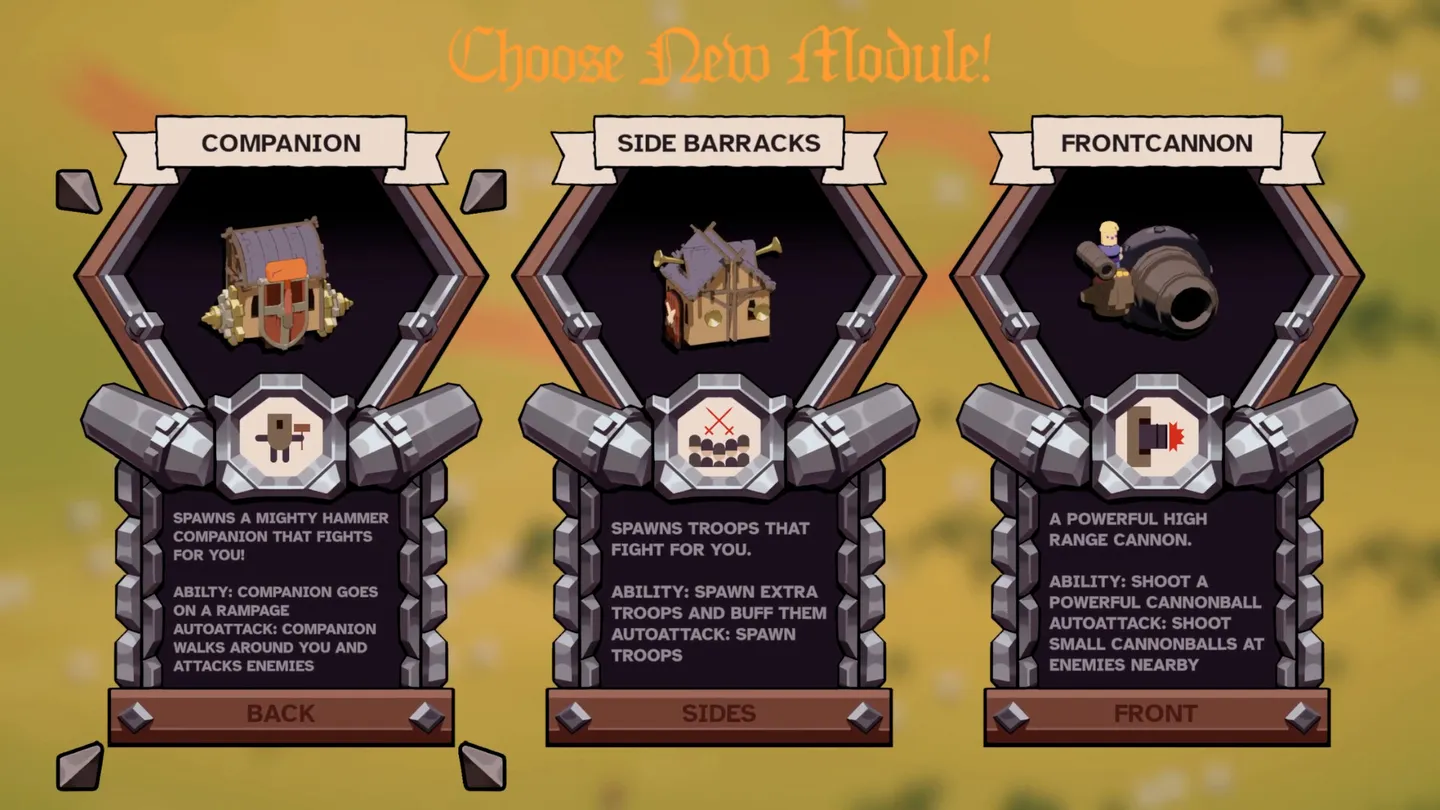
The module cards label separate Back, Sides and Front positions.
Direct Weapons and Their Firing Lanes
Cannon, Front Cannon, Top Mortar, Side Ballista, Side Flamethrower, and Ram all deliver damage from the castle itself, but they ask for different positioning.
Cannon and Side Ballista are broadside weapons. Their descriptions explicitly place their attacks on the sides, so the castle must pass beside targets or turn until the correct flank has access. Side Flamethrower uses the same general orientation at closer range. These modules should be read as lateral coverage rather than generic weapons that automatically solve threats in every direction.
Front Cannon and Ram are heading-dependent. Front Cannon projects damage ahead at range, while Ram turns the castle’s body and movement path into the attack. If a target remains beside or behind the vehicle, neither description supports assuming full access to it. The immediate decision is whether the castle can safely face the intended target, not whether the module has an attractive name.
Top Mortar belongs to the roof family and launches cannonballs from the top. That separates its mount from the side and front weapons, but the documented descriptions do not establish an exact firing radius or minimum range. Use the current module card and on-screen targeting behavior for those details rather than carrying numbers over from an older recording.
Summons, Deployments, and Persistent Pressure
Side Barracks, Front Barracks, Companion, and Turret Layer create allied attackers instead of relying entirely on a projectile fired from the castle. This changes what must be inspected in the interface.
For a direct weapon, the important cues are origin and direction. For a summon, the important cues are where the unit appears, whether it follows or remains deployed, and which enemies it chooses after spawning. Side Barracks and Front Barracks are distinguished by their mounting position as well as by their troops. Front Barracks is specifically described as spawning Biker Knights. Companion produces a hammer-wielding allied unit, while Turret Layer places a friendly Ballista turret that attacks nearby enemies.
Mine Layer and Catapult also create persistent pressure, but they do so through the route behind the castle. Mine Layer drops mines; Catapult leaves a damaging trail. They should be evaluated as trailing coverage. Passing through an area and pulling enemies across the resulting hazard matches their supported geometry more closely than stopping and expecting immediate forward fire.
Official notes for Hotfix 0.9.14, dated September 21, state that allied units became immune to fire, stun, and knockback. The same note explains that allied units were already invincible. That is a confirmed update-level rule for allied units, distinct from older player footage showing how particular summons behaved during individual runs.
Mages, Towers, and Local Area Control
The tower and mage group is not one uniform attack class. Each entry needs to be read by its target rule.
Cannon Tower targets the strongest nearby enemy. Archer Tower attacks nearby enemies without the same strongest-target wording. Fire Mage contributes fire attacks, while the lightning-based mage attacks nearby enemies and can stun them. Force Mage is different from all three because its supported function is displacement: it pushes enemies away from the castle rather than merely adding another stream of damage.
This distinction prevents a common inventory mistake. A module mounted on a roof is not automatically an overhead artillery piece. Top Mortar fires from the top, Cannon Tower applies a nearby priority rule, Archer Tower supplies local ranged pressure, and Force Mage controls surrounding space. The shared mount family does not erase those different jobs.
The official 0.9.14 notes refer to Electric Mage and record a buff to its automatic attack. A player-facing inventory source uses Lightning Mage for the nearby lightning-and-stun module. Because the reviewed descriptions do not prove that these are separate modules, treat Electric Mage and Lightning Mage as alternate labels in this reference rather than counting both.
Mobility Modules Are Not Ordinary Weapons
Dash and Teleporter change the castle’s position. Dash accelerates the vehicle forward and emits flames behind it during the boost. Its two effects should be read together: the movement changes where the castle will be, while the flame trail affects the space it just crossed.
Teleporter moves the castle to a location in front of the vehicle. The supported description does not provide a distance, collision rule, or invulnerability window, so those details should be checked in the current interface and actual run state. Its inventory role is forward relocation, not sustained projectile damage.
Force Mage also belongs near this operational group even though it is a mage. Pushing nearby enemies changes spacing without moving the castle itself. Dash moves the vehicle, Teleporter relocates it, and Force Mage moves threats away. Keeping those effects separate makes the inventory easier to read.
Vehicle Layout Changes Module Access
A dated player recording in the reviewed Early Access material showed Spiderburg with a front slot, a rear slot, two roof slots, and no side slots. The recording showed two roof positions; later in that run, two mortars were visible. This supports mid-run duplication, but does not establish whether identical modules can both be selected in the initial loadout. This is useful evidence of how strongly a chassis can reshape module access, but it is a player observation rather than an official promise that every current version preserves that exact interface.
The safe procedure is to inspect the selected vehicle’s loadout every time the chassis changes. If a vehicle has no side slot, Cannon, Side Ballista, Side Flamethrower, and Side Barracks cannot simply be treated as interchangeable with roof choices. Additional roof space instead increases access to modules such as Top Mortar, towers, and mages that the current interface marks as eligible.
A Practical Module-Reading Checklist
Use this sequence whenever an unfamiliar module appears:
- Identify the visible slot label. Record whether the option belongs to the front, side, rear, or roof position on the selected vehicle.
- Read the attack origin. Look for wording such as from the sides, from the top, behind the vehicle, nearby enemies, or in front of the vehicle.
- Classify the delivery method. Separate direct projectiles, collision attacks, allied summons, placed turrets, trailing hazards, displacement, and movement abilities.
- Separate automatic and activated behavior. Player recordings show module screens with distinct automatic-attack and ability information. Do not assume that an impressive activated effect describes what the module does continuously.
- Confirm the current name. Side Arms, Front Cannon, and Electric Mage may appear under slightly different labels in guides or older recordings.
- Recheck after changing vehicles. The permanent inventory may remain available while the chassis changes which categories can actually be equipped.
The practical next step is to open the current module collection and label each visible option by slot and geometry. Once the available front, side, rear, and roof positions are accounted for, every module has a clearer job: attack along a firing lane, control nearby space, leave danger behind, create an allied attacker, or reposition the castle.