
Wanderburg How to Destroy Health Boxes and Unlock Repair Crew
- Reviewed
- Scope
- Dated evidence; no installed-build testing
Health Boxes are breakable healing objects found during a run. Destroying one restores health, and each destroyed box also advances the cumulative Repair Crew objective. The requirement shown in the recorded Early Access objective is destroy 100 Health Boxes overall. “Overall” is the key word: this is account progress across runs, not a demand to find 100 boxes in one attempt.
The practical method is simple: identify the healing box, bring it into your damage path, break it, and confirm either the healing response or an increase on the objective counter. Its two supported uses happen when it breaks: immediate recovery during the run and permanent progress toward Repair Crew.
The short answer
- Target: the breakable object named Health Box in the objective text; some official text calls the same kind of object a health crate.
- Action: smash the object during a run. A player mechanics overview describes these crates as granting health when smashed.
- Permanent goal: destroy 100 overall to unlock Repair Crew.
- Counting rule: treat the objective as cumulative unless the in-game wording on your current build explicitly says otherwise.
- Verification: use the objective counter as the authoritative progress check. A health increase confirms that you broke a healing object, but the counter confirms credit toward the Crew condition.
- Important limitation: the recorded runs do not establish a fixed box route, guaranteed spawn count, or best biome.
How to identify the correct Health Box
Identify the object by its healing response and objective credit. The unlock condition calls it a Health Box, while an official hotfix and a player mechanics overview call it a health crate. The recorded descriptions do not establish one dependable color or model across builds. Confirm what the object does instead of assuming that every small crate is the healing target.
Use this confirmation sequence when learning the object:
- Notice your current health before approaching a suspected box.
- Break the object with controlled damage instead of letting a crowded fight hide the result.
- Watch for the healing response immediately after it breaks.
- When possible, check the Repair Crew objective before and after the break.
- If health rises and the objective advances, you have a confirmed Health Box for your current build.
The objective counter is especially useful when your castle is already at full health. A box may still count as destroyed when there is no missing health to restore, but the recorded runs do not explicitly document that full-health case. When you want an unambiguous identification test, use a box after taking some damage and compare the counter as well.
Confirm the healing behavior once; after that, use the matching model you see in the same game build. Do not classify every small destructible object as a Health Box, because the recorded runs do not establish a broader visual rule.
How to destroy Health Boxes reliably
The recorded runs show boxes being smashed during ordinary play, and the displayed objective tracks destruction overall. Make each break deliberate enough that you can tell it was your target and that it received credit.
- Read the objective wording before the run. Find the Repair Crew entry and note its current count. This gives you a baseline and prevents guessing from memory after a busy fight.
- Scan open ground while moving through the run. Treat a suspected Health Box as a short detour, not a reason to drive blindly through a dangerous group. The goal persists across runs, so one box is never worth losing a stable attempt.
- Clear enough space to see the object. Enemies, projectiles, and a growing castle can obscure small targets. Approach from a direction that keeps the suspected box visible.
- Put the box inside a controlled damage path. The player mechanics overview describes that smashing the crate is the trigger, but it does not prescribe one mandatory weapon. Use damage you can aim or position predictably rather than assuming only one module can break it.
- Confirm the break. Look for the object to disappear or break and for the healing response. If you are tracking the Crew goal, check that the cumulative count increased.
- Resume the run immediately. Once the break registers, continue toward the run’s existing objective and repeat the process whenever another confirmed Health Box appears.
There is no need to save every Health Box until you are almost defeated. The permanent objective rewards destruction, while the immediate effect rewards timing. If you have meaningful missing health and can break the box safely, use it. If you are nearly full and the area is calm, choose whether the objective point or the potential later recovery matters more. That is a run decision, not a different unlock rule.
Make the 100-box objective manageable
Because the condition says overall, consistency is more important than forcing one extraordinary run. Begin each attempt by noting the counter, destroy confirmed boxes that are reasonably safe to reach, and verify the new total after the run.
A useful decision order is:
- Preserve the run when the box is surrounded by threats.
- Take a nearby box when you need recovery.
- Break an easy box even if healing is not urgent when permanent progress is your current goal.
- Skip speculative detours based on an unverified spawn route.
- Recheck the objective at the next safe menu opportunity.
The recorded runs do not establish that a particular land, difficulty, or overtime phase is required for Health Boxes. It also does not provide a verified per-run total. Accumulate boxes opportunistically during normal runs instead of following a route that promises unsupported results.
Do not confuse a quiet counter with a one-run reset. A separate Golden Dunes objective explicitly uses “in one run,” while Repair Crew is described with “overall.” That contrast supports cumulative progress. If your current interface shows different wording, follow the live interface because Wanderburg is in Early Access and objectives can change.
Use the healing without misreading old numbers
A dated player mechanics overview reported that smashing a health crate restored health and that the healing increased after bosses. It also illustrated the behavior with specific early-run health values. Those observations help explain why a box can remain relevant as a castle grows, but they are not an official current-build stat table.
The decision does not require an exact number. Judge the box by your visible missing health and the danger around it:
- When damaged and safe to approach, break it for recovery and objective progress.
- When full or nearly full, decide whether immediate permanent progress is worth giving up a later heal.
- During a crowded encounter, do not assume a box will rescue a bad approach; first create enough space to reach and break it.
- After a boss, observe the actual healing in your installed build instead of relying on an old quoted value.
Health Boxes are therefore not merely collection objects. Their healing can affect survival, while every confirmed destruction moves the account objective forward.
Unlock Repair Crew after the counter reaches 100
Repair Crew is tied to the cumulative condition destroy 100 Health Boxes overall in both the dated progression guide and a captured player run. Once the objective reaches 100, look for the unlock notification or the updated entry in the permanent progression interface.
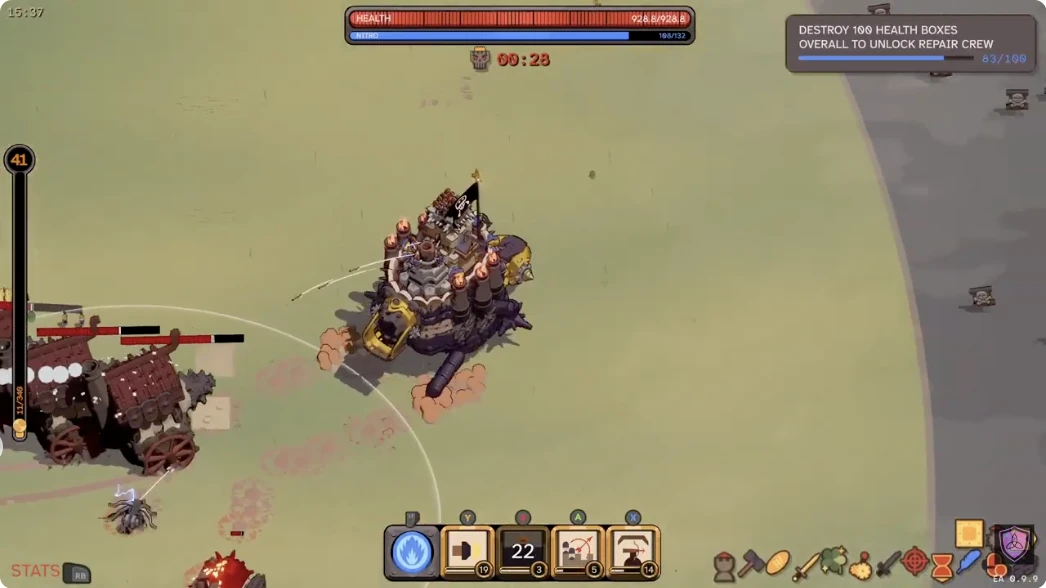
Recorded Early Access gameplay shows cumulative progress toward destroying 100 Health Boxes to unlock Repair Crew.
Keep the following states separate:
- In progress: the Health Box counter is below 100.
- Condition completed: the counter has reached the requirement and Repair Crew should be unlocked as an option.
- Available to equip: Repair Crew is present in the appropriate loadout or permanent selection interface and can be selected under the rules shown there.
The broader progression material warns that completing an unlock condition and owning or equipping the resulting option are not always the same step. It does not provide a verified Repair Crew price or confirm that this specific Crew always needs a separate purchase, so do not assume a cost. Inspect the permanent screen after the notification. If Repair Crew appears but cannot yet be selected, read the requirement displayed there rather than repeating the 100-box objective automatically.
A captured player transcript showed a confusing state: the player read the “destroy 100 health boxes overall” condition while saying Repair Crew was already owned, then called it a bug. That is a dated individual observation, not proof that every current installation has the same problem. It does show why the permanent screen matters more than a single repeated objective line.
What to check when progress appears stuck
Start with evidence you can observe, then separate an identification problem from a counter problem.
- Confirm the target healed you when broken. If it did not, you may have destroyed a different object.
- Compare the objective count before and after one isolated box. Checking a single controlled event is clearer than reviewing an entire chaotic run.
- Verify that the wording still says overall. Early Access updates can alter conditions or interface text.
- Check whether Repair Crew is already present in the permanent interface. A stale objective line is different from a failed unlock.
- Restart the game only as a diagnostic refresh, not as a claimed fix. The developer notes do not establish a universal counter repair procedure.
- Preserve the exact displayed state if it still fails. Record the game version, count before and after, objective wording, and whether healing occurred. Those details distinguish a counting issue from hitting the wrong object.
There is one relevant official update, but its scope is narrow. Hotfix 0.9.7, posted September 9, 2026, fixed an issue where bosses could get stuck on health crates. That confirms the crates were recognized battlefield objects, but it does not say the Repair Crew counter was changed or fixed. The official news checked on October 9 include Hotfix 0.9.14, published September 21, so 0.9.7 is update history rather than the current baseline.
Open the Repair Crew objective, write down the current count, and enter a normal run. Break one clearly confirmed Health Box, verify the healing response, then check for exactly one unit of cumulative progress. Once that controlled test works, continue collecting safe boxes across runs until the counter reaches 100, then inspect the permanent interface for Repair Crew’s actual post-unlock state.