
Wanderburg Bug Doesn't Consume: Valid Targets and Fix Checks
- Reviewed
- Scope
- Dated evidence; no installed-build testing
If your castle touches an eligible target but does not consume it, first test a target that the game explicitly describes as food for growth. Villages, wandering flocks, and smaller fortresses are the confirmed categories. Powerful enemy castles are different: the official description says to defeat them to push evolution further, so simple contact with a strong enemy is not a clean consumption test.
A broad failure on confirmed targets can match a reported bug. The clearest dated report came from the Early Access launch day: players described small creatures and other objects stopping the castle, no consumption, and no growth. One Linux player tied the behavior to Proton 9.0-4 and said switching to Proton Experimental or Proton Hotfix restored normal behavior on that system. That is a player workaround, not a developer-certified universal fix.
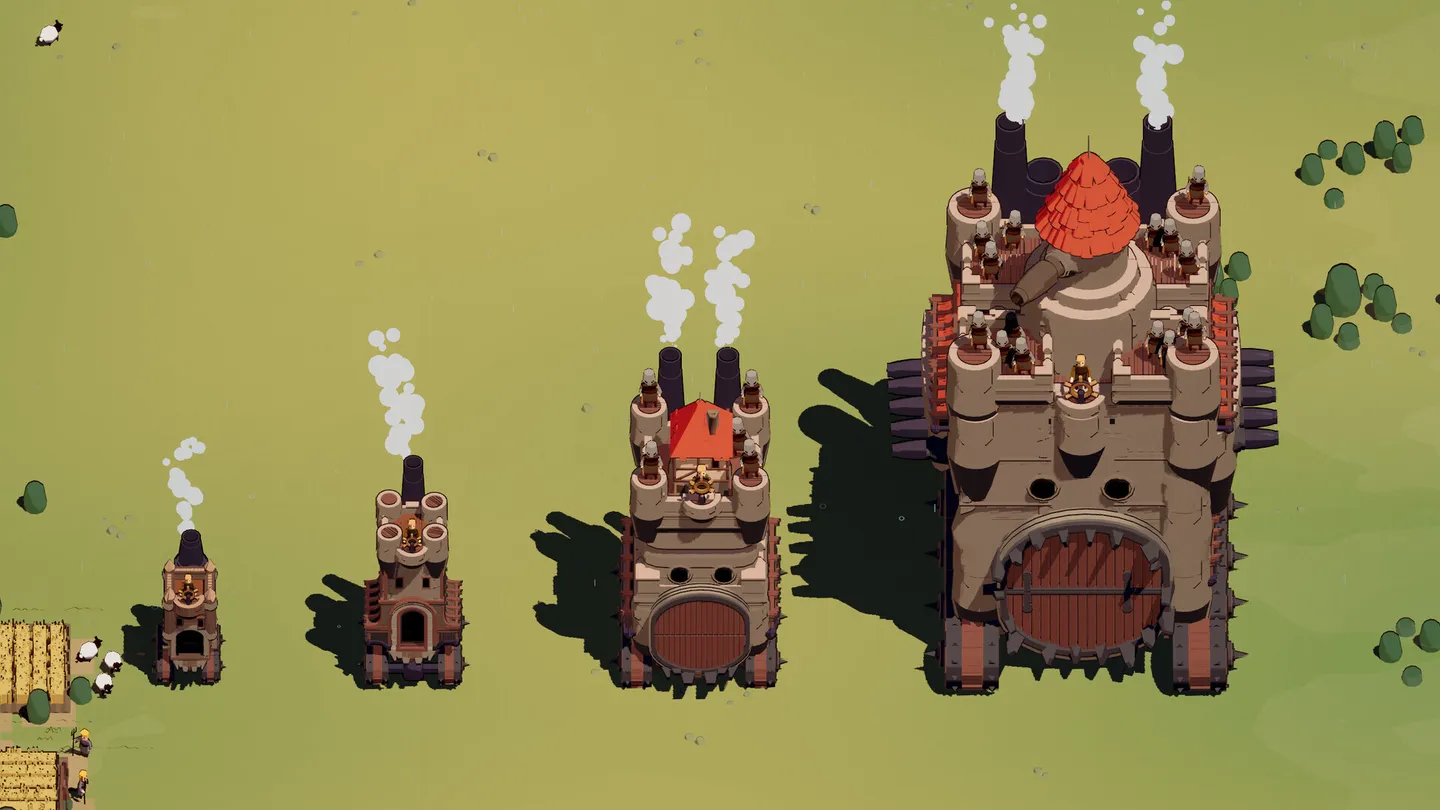
Castle growth provides a visible result to compare during a consumption check.
Start by separating a wrong target from a broken interaction
Use the result of contact, not the appearance of the object, to classify the problem.
| What you test | What the official description supports | How to interpret failure |
|---|---|---|
| A fleeing village | Villages feed castle growth | Repeated contact with no consumption is a meaningful failure signal |
| A wandering flock | Flocks feed castle growth | If the flock behaves like a solid barrier and is never consumed, the symptom resembles the launch-day report |
| A smaller fortress | Smaller fortresses feed growth | Confirm that it is actually smaller before using it as evidence of a bug |
| A powerful enemy castle | Defeating it pushes evolution further | Contact alone does not prove that consumption should happen |
| Any other scenery, building, container, or creature | No complete consumable list is verified here | Do not label the run bugged from this target alone |
This distinction matters because the game is built around driving into a battlefield full of moving and static objects, but the official description does not say that every object must disappear on contact. A failed collision is only strong evidence when the target belongs to a confirmed category and the expected consumption interaction fails repeatedly.
Run a short controlled contact test
Do this before changing compatibility settings or abandoning a run. The goal is to determine whether you have one invalid assumption, a target-specific problem, or a run-wide consumption failure.
- Start a fresh run and note the platform you are using: supported Windows, Steam Deck, or another Linux setup through Proton. A fresh run is a clean comparison, not a promised fix.
- Find one clearly recognizable fleeing village or wandering flock. Avoid using a boss, powerful enemy castle, unknown prop, or ordinary scenery as the first test.
- Make deliberate contact and watch whether the target is actually swallowed or disappears through the consume interaction. Note any normal resource feedback and whether the object instead blocks momentum. Do not require the castle to become visibly larger after each individual target: the documented core loop does not establish an immediate resize on every consumption. Damage dealt, a defeat at range, or physical overlap alone does not confirm consumption.
- Repeat the test with a second confirmed category if one is available. A single object can be misidentified; failures across both a flock and a village are much more useful for diagnosis.
- Note whether the object blocks momentum instead. The launch-day report described livestock and peasants stopping the moving tower so severely that it could become trapped around other threats.
- Continue only long enough to learn whether a boss defeat or an upgrade coincides with the behavior changing. Do not assume either event is a required unlock condition.
A normal result on one confirmed category means the consume system is functioning at least partly. Recheck the original target rather than applying a platform workaround immediately. A failure across multiple confirmed targets, especially when small targets become unusually solid obstacles, is the stronger match for the reported bug.
Recognize the reported failure pattern
The September 8, 2026 community thread described more than a lack of growth. The original player said the tower would not gobble even small targets and seemed unable to push through them. Collisions killed momentum, and groups of cattle or peasants could leave the castle stuck while other moving towers remained dangerous. Another Linux player reported unusually solid livestock, chests on wheels that did not drop, and buildings that did not pop.
Those extra symptoms are useful because they point to a wider interaction or physics failure, not merely confusion about one target. Use the following cluster as your comparison:
- confirmed or normally small targets never get consumed;
- contact removes most or all forward momentum;
- creatures behave like dense barriers instead of feed for growth;
- several world interactions appear wrong in the same run;
- the behavior begins at the start of a run rather than on one isolated object.
Not every point must appear, but multiple points together make the diagnosis stronger. The same discussion also included a player who reported smooth behavior, so the problem was not shown to affect every system or every run.
Do not mistake a later recovery for a game rule
One commenter said consumption did not begin until after the first boss was defeated and the castle grew. The original poster later reported that, after many restarts, a power-up caused consumption to start working in one run. These are dated player observations. They do not establish an official rule that consumption is locked behind the first boss, and they do not identify a specific power-up that reliably repairs the system.
The official game description says consuming villages and fortresses is part of the core loop and expands the castle. It does not state that the first boss unlocks consumption. Treat a boss defeat or power-up recovery as evidence that a broken run can sometimes change state, not as a route players are expected to follow.
That leads to a practical decision: if confirmed targets are solid and non-consumable from the opening area, do not spend a long run trying random upgrades in hope of finding a fix. Record the symptom, try the platform-appropriate branch below, then retest the same kind of target.
Use the Windows branch for a supported configuration
Windows 10 or higher is the desktop operating system listed in the official requirements. If the failure occurs there, Proton advice is irrelevant.
- Record the game build shown by your client before doing anything else.
- Close the affected run and relaunch the game, then repeat the controlled test in a fresh run. This checks whether the failure is bound to one run; it does not imply that restarting is a verified repair.
- If the same confirmed target categories still fail, preserve a short before-and-after recording rather than repeatedly restarting.
- Include whether the castle loses momentum, whether the targets remain present, and whether any growth occurs.
- Report the reproduction through the official community channels the developers say they monitor.
The Steam listing checked on October 9 shows Hotfix 0.9.14 as the latest regular update displayed on Steam, dated September 21, 2026. Its published notes list several bug, stability, performance, and gameplay changes, but they do not name this consumption failure. Do not tell support that 0.9.14 fixed it, and do not assume an unlisted fix from the word stability.
Use the Proton branch only for Linux or Steam Deck
Steam lists the game as Steam Deck Playable, not Verified, while the desktop requirements name Windows rather than Linux. The launch-day workaround therefore belongs in a compatibility test, not in the basic gameplay rules.
A player in the dated thread reported that the failure occurred while the default compatibility mode was Proton 9.0-4. The same player said normal behavior returned after using Proton Experimental or Proton Hotfix, either as the default or as the per-game override. No developer statement in the official notes certifies those versions as the fix.
Test the report without turning it into a guarantee:
- Open Wanderburg's per-game compatibility settings and record the selected Proton version.
- If it is Proton 9.0-4 and your symptoms match the full collision pattern, choose Proton Experimental or Proton Hotfix if Steam offers it.
- Change only the compatibility version. Keep the same test method so the result is comparable.
- Launch a fresh run and make contact with a confirmed category such as a wandering flock or fleeing village.
- If normal consumption returns, keep a note of the working version. Record later growth separately rather than requiring an immediate size increase after one target. If they do not, revert rather than cycling through unrelated gameplay changes.
- Include both the failing and tested Proton versions in any report. Saying only Linux or Steam Deck removes the detail that made the original workaround useful.
The names Experimental and Hotfix describe moving compatibility branches, so a success reported on September 8 does not prove the same result on every later build. It is still the most specific community-reported workaround for the matching Linux symptom.
Prepare a bug report that can be compared
A useful report lets another person reproduce the same contact state. Include the installed build, operating system, Steam Deck status if relevant, and the exact Proton version if one is active. Name the target category you tested rather than calling it something on the map. State whether it was consumed and whether forward momentum stopped. If the whole run also lacked growth, record that separately with its duration and relevant boss or upgrade events.
Also record when the failure started and whether it changed after a fresh run, boss defeat, or power-up. If an alternate Proton version changed the result, give both version names and keep the successful and failed observations separate. A short clip beginning before contact is more useful than an image taken after the castle is already stuck.
Do not report the date you captured the problem as though it were the game's version. Do not cite the Early Access roadmap as a fix commitment. The developers have said that performance and stability remain priorities, but that does not assign a status or delivery date to this specific issue.
Take the next action in this order
- Test a fleeing village or wandering flock, then a second confirmed category if possible.
- If only the original object fails, treat its consumable status as unverified and continue the run.
- If several confirmed targets fail and become solid barriers, classify it as the reported consumption-and-collision pattern.
- On Windows, relaunch once, reproduce in a fresh run, and capture the build and contact result.
- On Linux or Steam Deck with Proton 9.0-4, compare one fresh run under Proton Experimental or Proton Hotfix, clearly treating it as a community workaround.
- If the failure persists, stop searching for a hidden boss or power-up prerequisite and submit the compact reproduction details.
That sequence answers the important question first: whether the game rejected an invalid target or whether the consume-and-grow interaction itself failed.