
Wanderburg Game Download: Install the Right Steam Edition
- Reviewed
- Scope
- Dated evidence; no installed-build testing
The legitimate Wanderburg game download is the Steam release for Windows. The official listing is Steam App ID 3624140, developed by Randwerk and published by Sidekick Publishing. Buy the base game or the two-item Supporter Pack bundle through that listing, then install Wanderburg from the Steam Library attached to the purchasing account. The game entered Early Access on September 8, 2026, so the download is playable but still in active development.
For the simplest route, choose the base game. It is the game entry required to play. Choose the Supporter Pack bundle only if you intentionally want both Wanderburg and the separately listed Wanderburg - Supporter Pack DLC. The official DLC listing describes a cosmetic-only pack with the soundtrack by Tumult Kollektiv and pirate decorations: a companion boat, steering wheel, skull figurehead, and pirate-flag cabin. It does not grant gameplay advantages and requires the base game.
Make the purchase decision in three checks
Before opening the cart, confirm three things:
- You are on the right product. The page should identify Wanderburg, App ID 3624140, Randwerk as developer, and Sidekick Publishing as publisher.
- Your PC meets the published minimum. The supported desktop requirement starts with 64-bit Windows 10 or higher and the hardware listed below.
- You accept an Early Access purchase. The current version is playable, but content, balance, stability, and price can change while development continues.
If all three checks pass and you only want to play, buy the base game. If the third check does not pass, wait and reassess later rather than treating the current download as a finished release.
Check the PC before you buy
The official minimum requirements are specific enough to check before downloading:
| Requirement | Published minimum |
|---|---|
| Operating system | Windows 10 or higher |
| System type | 64-bit processor and operating system |
| Processor | Intel Core i5 10th Generation |
| Memory | 4 GB RAM |
| Graphics | Nvidia GeForce GTX 1660 Ti |
| DirectX | Version 11 |
| Storage | 2 GB available space |
The recommended section in the official Steam listing adds DirectX 12, but it does not provide a complete second processor, memory, graphics, or storage configuration. Do not invent a “recommended PC” from the missing fields. Compare your machine directly with the published minimum and leave additional free space for Steam’s normal download and update workflow.
The store also marks Steam Deck compatibility as Playable, not Verified. That label is useful if Steam Deck is your intended PC device: it indicates a supported compatibility category, but it is not the stronger Verified rating. The store lists full controller support for Xbox and PlayStation controllers as PC input support. A controller is optional because the game is also described as playable with mouse and keyboard.
Choose between the base game and Supporter Pack bundle
Steam presents three related purchase entries that should not be confused:
| Store entry | What is included | Best choice when |
|---|---|---|
| Wanderburg | The base game | You want the game and only the base game |
| Wanderburg - Supporter Pack | A separate DLC item | You already own the base game and have checked the current DLC description |
| Wanderburg Supporter Pack bundle | Two items: the base game and Supporter Pack DLC | You want both listed items after comparing the current cart |
The captured Steam view displayed the base game at $14.99, the separate Supporter Pack at $5.99, and the two-item Supporter Pack bundle at $18.88. Those are dated storefront displays, not permanent prices or a confirmed currency region. Steam may show different totals because of region, tax, discounts, or later price changes. The developer also states that the price might increase during Early Access as content and features are added.
Use the live Steam cart as the decision point. Confirm the item count, current total, and whether your account already owns anything in a bundle. Do not choose the bundle merely because its name sounds like a different gameplay edition. The Steam listing confirms one base game plus one DLC item; it does not establish separate Standard, Deluxe, or Ultimate game builds.
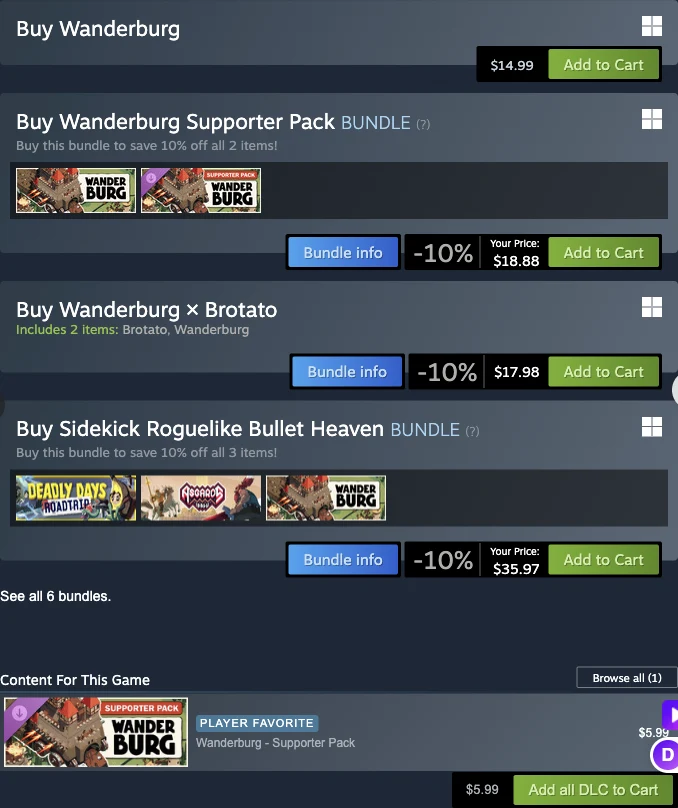
The dated store panels distinguish the base game, optional DLC, and bundles.
The base game already carries the features listed for Wanderburg: single-player, Steam Achievements, Steam Cloud, Stats, Leaderboards, and Family Sharing. The Supporter Pack is optional cosmetic and soundtrack DLC; the base game supplies gameplay, installation, updates, and the listed Steam features.
Install Steam from the official client
If Steam is not installed, use Steam’s official installer. Steam Support gives a short, reliable setup path:
- Sign in to Windows with an administrator account on the machine where Steam will be installed.
- Run the official Steam installer.
- If Steam was previously installed and you are reinstalling it to repair the client, run the installer again; Steam Support says it will reinstall Steam automatically.
- If the installer cannot connect, check whether the network permits the ports Steam requires.
- Finish the client installation, open Steam, and sign in or create an account in the client.
Keep the account choice deliberate. Steam Support states that a game is tied to the Steam account to which it is added and cannot be registered again to a different account. Before purchasing Wanderburg, verify that the account shown in the client is the one you intend to keep using.
Never give an account password to another person or enter it into a supposed Wanderburg downloader. A legitimate installation does not require an unofficial standalone launcher, a third-party archive, or a site that asks for Steam credentials.
Buy Wanderburg on the correct Steam account
Once the Steam client is ready, use this purchase sequence:
- Search the Steam Store for Wanderburg.
- Verify App ID 3624140 and the developer and publisher names before adding anything to the cart.
- Review the Early Access notice. The developer’s estimate was roughly 6 to 12 months in Early Access, but the statement explicitly allows that timing to change with development and player feedback.
- Select either the base game or the two-item Supporter Pack bundle using the edition checks above.
- Review the live cart rather than relying on an old captured price.
- Complete the purchase while signed in to the intended Steam account.
- Open Library and confirm Wanderburg appears in that account’s game list.
This path keeps the transaction and installation inside Steam. Key-reseller offers, emailed delivery promises, and account-transfer claims are outside this page’s legitimate installation route and are not needed to obtain the official Steam download.
Install Wanderburg from your Steam Library
Steam Support says that registered games appear under Library and that double-clicking a title starts installation and, once installed, runs it. Use that supported flow:
- Open Library in the Steam client.
- Find Wanderburg in the account’s game list.
- Double-click Wanderburg to begin installation.
- Follow the client’s installation prompts.
- Keep at least the published 2 GB of available storage and do not interrupt the client while it downloads.
- Wait until Steam marks the download as complete.
- Start Wanderburg from the same Library entry.
If Wanderburg is missing from the Library immediately after purchase, first confirm that the client is signed in to the same account used at checkout. Account mismatch is a more useful first check than downloading the game from another site. If the correct account is open but the purchase or download state is still wrong, use Steam Support’s help flow for the account and transaction.
Know what Steam keeps current
Steam is both the delivery client and the update path. Steam Support states that it automatically keeps games current with the latest available patches. Leave the Steam client able to complete its update work before judging which Wanderburg build is installed.
The official store capture lists Hotfix 0.9.14, dated September 21, as the latest regular update shown. It includes stability improvements, bug fixes, balancing changes, and a 240 FPS limit for the main menu and overworld. A newer official news post dated September 30 presents an Early Access roadmap, but that roadmap is an announcement, not a newer installed game version. Do not treat its later date as proof of a build beyond 0.9.14.
Those dates are a captured snapshot, not a permanent version promise. Check the Steam client’s completed update state when installing. A player comment, old video, or pre-release beta instruction cannot establish the build that Steam currently delivers.
Fix common installation blockers
Use the blocker that matches the stage where the process stopped:
- Steam itself will not install: rerun the official installer with an administrator account. For a prior Steam installation, the official guidance permits running the installer again.
- Steam cannot connect: check the network path and the ports required by Steam. A blocked client cannot complete a legitimate game download.
- The purchase is not in Library: confirm the signed-in account first, because the game remains tied to the account that received it.
- The Install action is unavailable: confirm that the base game, not only the separately listed DLC, belongs to the current account.
- The machine fails the requirements check: do not assume the 2 GB storage figure is the only requirement. Windows version, 64-bit support, processor, memory, graphics, and DirectX all matter.
- A page still offers beta access: treat that as outdated pre-release material. Wanderburg entered Early Access on September 8, 2026, and the current legitimate path is the released Steam listing.
- An unofficial page promises a separate download: return to the Steam product identified by App ID 3624140. The official materials identify Steam as the platform.
For launch crashes or performance tuning after installation, use a dedicated troubleshooting guide. This page ends when the correct Steam edition is owned, downloaded, updated, and ready to start.
Practical next steps after the download
Open Wanderburg once from Steam Library and confirm that the game reaches its start screen. Keep Steam signed in long enough to finish any pending update before beginning a run. The listing identifies the game as single-player and includes Steam Cloud, Achievements, Stats, and Leaderboards, so those Steam services should remain associated with the account that owns the game.
After that first successful start, adjust input inside the PC version as needed: the listing supports mouse, keyboard, and full controller input. Keep the Supporter Pack decision separate from setup. If you bought only the base game, you have taken the direct, evidence-supported route required to install and play Wanderburg; consider the DLC later only after its current Steam description explains enough value for you to make that separate purchase.