
Wanderburg Languages: Interface, Subtitles, and Audio
- Reviewed
- Scope
- Dated evidence; no installed-build testing
As of October 9, 2026, Wanderburg’s Steam listing supports 16 interface and subtitle languages: English, French, Italian, German, Spanish from Spain, Japanese, Korean, Polish, Brazilian Portuguese, Portuguese from Portugal, Russian, Simplified Chinese, Latin American Spanish, Traditional Chinese, Turkish, and Ukrainian.
That answer applies to the game’s interface and subtitles, not necessarily to spoken dialogue. Steam’s language table leaves the Full Audio column blank for every listed language. This means no language is currently marked as having full localized audio. It does not prove that Wanderburg is silent, that its music contains no vocals, or that every sound is language-neutral.
Wanderburg entered Early Access on September 8, 2026. Because an Early Access product can change, use the current game-specific language table when making a purchase or troubleshooting a localization issue rather than relying on an old trailer, demo recording, review language, or Steam’s website navigation menu.
The 16 supported interface and subtitle languages
The following list reflects the language support shown for Wanderburg itself. Every row is marked for both Interface and Subtitles, while none is marked for Full Audio.
| Language | Interface | Subtitles | Full audio listed |
|---|---|---|---|
| English | Supported | Supported | No |
| French | Supported | Supported | No |
| Italian | Supported | Supported | No |
| German | Supported | Supported | No |
| Spanish – Spain | Supported | Supported | No |
| Japanese | Supported | Supported | No |
| Korean | Supported | Supported | No |
| Polish | Supported | Supported | No |
| Portuguese – Brazil | Supported | Supported | No |
| Portuguese – Portugal | Supported | Supported | No |
| Russian | Supported | Supported | No |
| Simplified Chinese | Supported | Supported | No |
| Spanish – Latin America | Supported | Supported | No |
| Traditional Chinese | Supported | Supported | No |
| Turkish | Supported | Supported | No |
| Ukrainian | Supported | Supported | No |
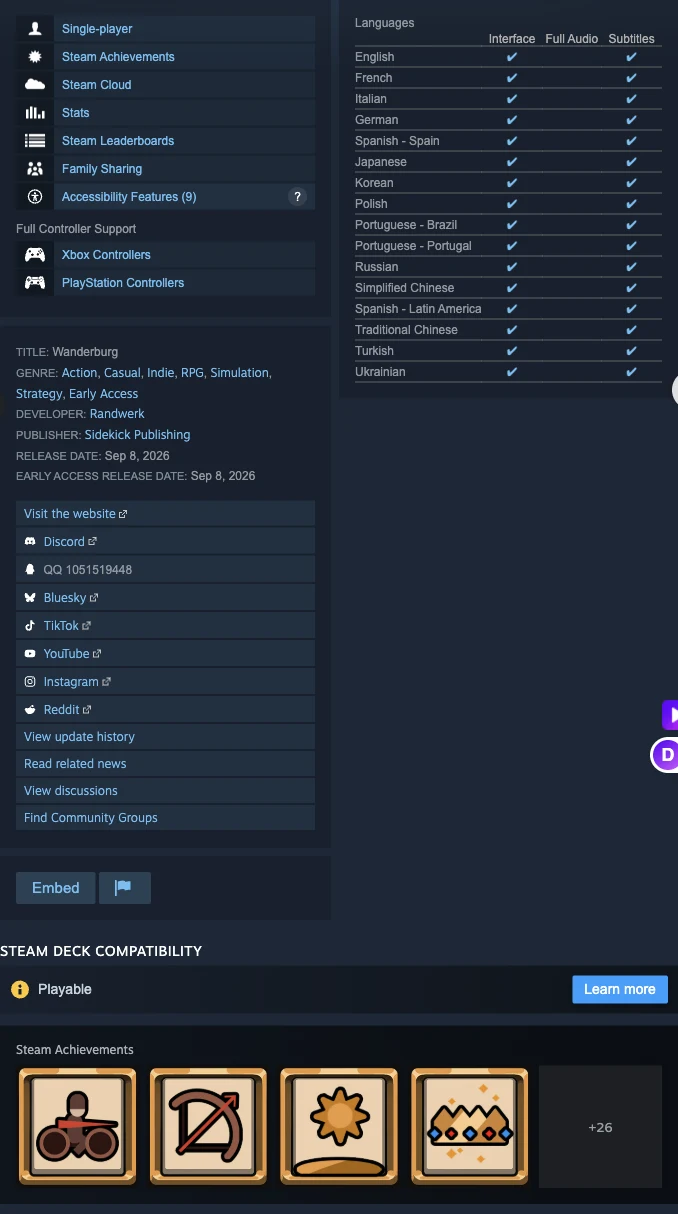
The official game language table lists interface and subtitle support separately from Full Audio.
“Interface” covers the written game interface classification shown by Steam. In practical terms, this is the category to check when you need menus and other on-screen text in a particular language. “Subtitles” is a separate supported category, although the table does not describe how much dialogue or narration requires subtitles. The table confirms the localization categories; it does not document the amount of spoken content.
The safest short answer is therefore: Wanderburg supports 16 written-language options, but Steam does not list full audio support for any of them.
Choose the correct regional language variant
Several entries are deliberately split into regional or writing-system variants. Treat those entries as separate choices instead of assuming that one broad language label covers all versions.
Spanish
Wanderburg lists both:
- Spanish – Spain
- Spanish – Latin America
A Spanish-speaking player should choose between those two supported variants based on the vocabulary and conventions they prefer. A generic claim that the game “supports Spanish” is true but incomplete because it hides the fact that two regional versions are listed.
Portuguese
Wanderburg also separates:
- Portuguese – Brazil
- Portuguese – Portugal
Do not interpret “Portuguese” on an abbreviated third-party list as proof of which version it means. The game’s complete table explicitly supports both variants. This distinction matters when evaluating menu terminology and localized written text.
Chinese
The two supported Chinese entries are:
- Simplified Chinese
- Traditional Chinese
These are separate written-language options. Seeing Chinese-language reviews or changing Steam’s storefront to Chinese does not identify which in-game writing system is selected.
The other ten options are listed without regional variants: English, French, Italian, German, Japanese, Korean, Polish, Russian, Turkish, and Ukrainian.
Steam display language and game support are different
Steam’s website and client offer a large language menu for navigating the store. That navigation menu is not Wanderburg’s supported-language list. It includes languages that do not appear in the game’s 16-language table, so using it as evidence would overstate what the game supports.
Keep these three language signals separate:
| Signal | What it tells you | What it does not prove |
|---|---|---|
| Steam website or client language | The language used by Steam’s own navigation | That Wanderburg has the same interface language |
| Wanderburg’s Interface and Subtitles table | Which written languages the product currently lists | That every language has localized spoken audio |
| Review-language filter | The language in which users wrote reviews | That the reviewed game build used that language |
For example, Thai appears among Steam’s general navigation choices in the captured store view, but it is not present in Wanderburg’s game-support table. That makes Thai a Steam display option, not a confirmed Wanderburg interface or subtitle language. The same rule applies to any other Steam navigation language absent from the 16 supported rows.
English review totals are also unrelated to localization coverage. They indicate the language of those reviews, not the only language in which Wanderburg can be played. Likewise, trailers labeled English, Japanese, or Korean confirm the presentation language of those particular trailers; they do not establish full in-game voice localization.
What the blank Full Audio column means
Every Full Audio cell in Wanderburg’s Steam table is blank. Read that narrowly: Steam does not mark the game as having full audio support in any listed language.
It would be incorrect to turn those blank cells into any of the following broader claims:
- Wanderburg has no sound.
- The game contains no spoken material.
- All players hear English voices.
- Every language uses the same voices.
- Music has no vocals.
- Interface localization automatically includes voice localization.
None of those conclusions is established by the Steam language table. The verified distinction is simply that interface and subtitle support are checked for all 16 languages, while full audio is not checked.
This distinction is useful before buying. If your requirement is readable menus and supported subtitle text, consult the Interface and Subtitles columns. If your requirement is fully dubbed dialogue in French, German, Japanese, or another language, the current listing does not confirm that requirement. Do not treat a localized trailer as a substitute for a Full Audio check.
How to verify the language you will actually use
Use the following sequence when checking support or diagnosing a mismatch. It avoids confusing Steam’s own language with Wanderburg’s localization status.
- Start with the game-specific table. Confirm that your required language is one of the 16 entries above. Do not use the long Steam navigation-language menu for this decision.
- Check the exact variant. Spanish, Portuguese, and Chinese each have two separately listed options. Match the full label rather than stopping at the broad language name.
- Separate written text from voices. Confirm Interface and Subtitles for readable content. Treat spoken-audio support as unconfirmed because the Full Audio cells are blank.
- Inspect the actual game interface after launch. Check a stable screen containing several labels, such as a main menu or settings screen. A translated Steam store page alone does not demonstrate that the game interface changed.
- Check more than one text type. Compare menu labels with another meaningful written interface state. This helps distinguish an active game-language choice from a storefront-only display change.
- Record the exact mismatch. If the expected language does not appear, note the selected regional variant, the screen that remains in another language, and whether the issue affects interface text, subtitles, or audio. Those are different localization categories and should not be reported as one vague “language problem.”
This process is especially important for a player who says, “Steam is in my language, but Wanderburg is not.” The first fact describes Steam’s interface. The second concerns the game. Compare the game’s visible text with its own supported-language row before concluding that localization is missing.
Avoid assuming that an operating-system language or Steam display language must automatically determine Wanderburg’s interface. The Steam table verifies the supported options but does not document an automatic selection rule or a specific in-game settings path. Confirm the result from the running game rather than inventing a menu sequence that may differ by build.
Release status and dated information
Wanderburg launched on Steam in Early Access on September 8, 2026. The captured store page listed a regular update, Hotfix 0.9.14, dated September 21, and an Early Access roadmap announcement dated September 30. Neither displayed announcement provides evidence of a language-list change, so the 16-row product table remains the relevant product record for this question.
Older pre-release or demo material should not override that Early Access product listing. A trailer may have an English, Japanese, or Korean label because it was prepared for a particular audience. That label describes the trailer and is not equivalent to a checked Full Audio cell. Similarly, a dated player observation can describe what one player saw in one build, but it cannot replace the current structured support table.
Because Early Access software may change, recheck the product’s own language table if full audio or a particular localization is a purchase requirement. A future update could alter support, but no additional language or dubbing promise should be inferred from the current material.
Practical language decision checklist
Before buying or launching Wanderburg for a particular language, make the decision in this order:
- For English, French, Italian, German, Japanese, Korean, Polish, Russian, Turkish, or Ukrainian, the current listing confirms interface and subtitle support.
- For Spanish, choose between Spain and Latin America rather than treating them as one unspecified option.
- For Portuguese, choose between Brazil and Portugal.
- For Chinese, choose between Simplified and Traditional Chinese.
- If your required language is absent from all 16 rows, do not infer support merely because Steam itself can display that language.
- If fully localized voices are essential, the current listing does not confirm them in any language.
- If written accessibility is the requirement, focus on the checked Interface and Subtitles columns and verify the visible result in the running game.
The actionable answer is clear: Wanderburg’s Early Access release supports 16 interface and subtitle languages, including separate regional options for Spanish and Portuguese and separate Simplified and Traditional Chinese entries. Its Steam listing does not mark full audio support for any language, so written localization and spoken audio must be evaluated as different requirements.