
Wanderburg Key: Steam Activation and Region Checklist
- Reviewed
- Scope
- Dated evidence; no installed-build testing
A Wanderburg key should be a Steam product code for the PC version of the game. Before redeeming it, confirm that the seller identifies the product as Wanderburg, names Steam as the activation platform, and allows activation in the country attached to your Steam account. The base game is developed by Randwerk, published by Sidekick Publishing, and has Steam App ID 3624140.
Do not treat every Wanderburg-branded code as the same product. The base game, the cosmetic Supporter Pack, a bundle, and a Steam gift can have different contents or redemption conditions. Regional eligibility also belongs to the specific key or gift, not to the title in general. Check those details before paying because Steam Support cannot remove a key's regional restriction or refund a third-party key that cannot be activated in your territory.
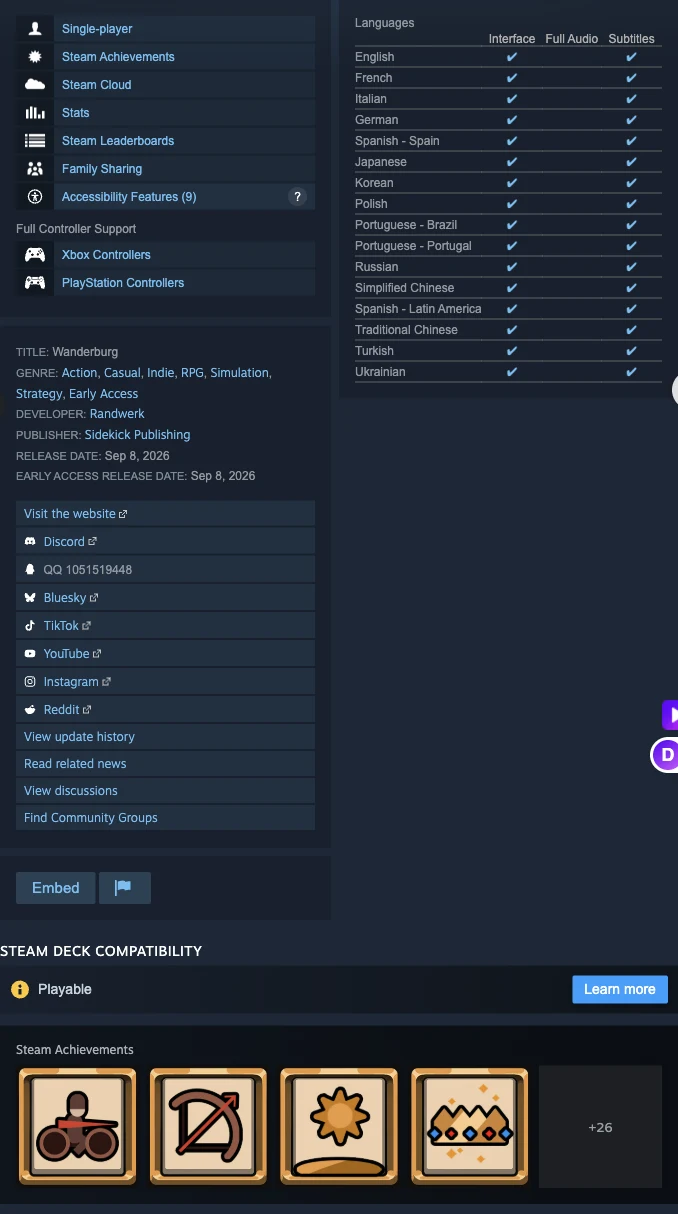
Confirm the Wanderburg title and publisher for the correct Steam product before entering a key.
Confirm the Product Before You Redeem
The most important check is whether the code grants the base game. A listing should give you enough information to distinguish the product without relying on a promotional image or a shortened title.
| Listing detail | What you should see | Why it matters |
|---|---|---|
| Product name | Wanderburg | Identifies the base game rather than unrelated content |
| Activation | Steam or Steam key | Confirms that the code is intended for Steam registration |
| Platform | PC | Matches the released Steam product |
| Developer | Randwerk | Helps distinguish the correct store entry |
| Publisher | Sidekick Publishing | Provides a second identity check |
| Steam identity | App ID 3624140, when an App ID is shown | Confirms the exact base-game application |
| Release status | Early Access, released September 8, 2026 | Prevents confusion with an old demo listing |
Wanderburg is currently an Early Access product. Redeeming a legitimate base-game key grants the Steam product; it does not promise a particular patch, a finished full-release edition, or permanent access to an earlier demo. Early Access content and balance may change as development continues.
The Wanderburg Supporter Pack is a separate cosmetic-only product that requires the base game. It includes a soundtrack and four pirate decorations, but it does not provide the base game or a gameplay advantage. If a listing says only “Supporter Pack,” “DLC,” or shows Supporter Pack app ID 5026240, do not buy it as a substitute for a Wanderburg base-game key.
A bundle is also not automatically a single reusable key. It can be a store purchase containing multiple items, and its fulfillment method must be stated by the seller. Confirm exactly what will be delivered rather than assuming that a bundle name guarantees a standalone Wanderburg code.
Check the Key Listing Before Purchase
Use this checklist on the seller's product page and again at checkout:
- Match the product name. It should clearly identify Wanderburg as the base game. Reject vague listings that do not distinguish the game from its Supporter Pack.
- Match the activation service. The listing or delivery message must say that the code registers on Steam. A code intended for another service will not become valid merely because Wanderburg is sold on Steam.
- Match the platform. The verified product is the Windows PC release. Controller support describes input support on PC and does not turn a key into a console edition.
- Read the region field. Look for your exact country, not only labels such as “global,” “international,” or the currency displayed by the storefront.
- Check delivery wording. A digital Steam key is normally supplied through the retailer's purchase record or emailed receipt. A Steam gift follows different redemption rules and should not be represented as an ordinary key.
- Keep the transaction record. Save the product description, stated region, order number, receipt, and the seller's support route. These details are important if the delivered code does not match the listing.
- Protect the code. Do not post it in a public message, screenshot, review, or forum. A code that another account redeems first cannot be reused.
Do these checks before activation. Once a valid key has been registered, it is tied to that Steam account and cannot be registered again on a different one.
Check Regional Eligibility Before Purchase
Steam does not apply one universal region rule to every retail key. Restrictions vary by publisher and by the specific stock sold through a retailer. A Wanderburg key that works in one country therefore does not prove that every key for the game works worldwide.
A GamersGate Canada listing captured on October 9, 2026 identified its Wanderburg product as Steam activation, PC, and activates in Canada. Its displayed eligibility list also included the United States, the United Kingdom, Australia, New Zealand, Japan, South Korea, and numerous European, African, Middle Eastern, Pacific, and Caribbean territories. That evidence applies to the retailer listing and stock shown at that time. It should not be converted into a permanent claim that every Wanderburg key from every seller has the same coverage.
Use the following decision path for the key you are actually buying:
- Find the seller's activation-region field for that exact Wanderburg offer.
- Confirm that your country is explicitly included.
- Confirm that your Steam store region correctly reflects the country where you permanently reside.
- If the region wording is missing or ambiguous, ask the retailer to confirm eligibility before purchase.
- Keep the retailer's answer and the checkout description with your receipt.
- If your country is excluded, choose a compatible offer instead of attempting to bypass the restriction.
Currency is not enough to establish eligibility. A page displaying Canadian dollars, U.S. dollars, euros, or another currency does not by itself define where its key activates. Likewise, the ability to open a retailer page from your location is not proof that the delivered code is valid for your Steam account.
Do not use a proxy or VPN to disguise your location when redeeming a restricted key or gift. Steam states that this violates its terms and may result in account restrictions. If your normal location and account region are eligible but the seller's page is unclear, resolve the ambiguity with the retailer rather than trying to work around it.
Activate a Wanderburg Key in Steam
Steam supports registration through its desktop client and through a browser. Use the Steam account that should permanently own Wanderburg, because a successfully registered key cannot later be moved to another account simply by entering it again.
Steam Client Method
- Launch the Steam client and sign in to the intended account.
- Open the Games menu at the top of the client.
- Select Activate a Product on Steam...
- Follow the onscreen instructions.
- Enter the Wanderburg product code exactly as delivered by the retailer.
- Complete the registration only for the account that should retain ownership.
Steam also exposes the same action from the + Add a Game control at the lower left of the client. Choose Activate a Product on Steam... there and continue with the onscreen instructions.
Browser Method
Steam Support also provides browser-based CD-key registration. Sign in to the correct Steam account before starting, use Steam's product-activation page, enter the code, and follow the displayed instructions. This is an activation alternative, not a different license type: the result is still registration to the signed-in Steam account.
Before submitting a browser activation, verify that you are on Steam's genuine site and that the account name is the one that should own the game. Do not paste a key into a retailer chat, an unofficial activation form, or a page reached through an untrusted message.
Resolve Common Activation Errors
The exact error narrows down the next useful action. Repeatedly submitting the same code does not correct a product, character, ownership, or regional mismatch.
Invalid Product Code
An invalid-code message means Steam does not recognize the entered code as a valid code for registration. First confirm that the retailer explicitly described it as a Steam key. Then compare the typed characters with the delivered code.
Steam specifically recommends checking commonly confused characters:
0againstQ,D, orO1againstIorLOagainstQorDBagainst8Gagainst6
Use the original receipt or retailer account page rather than a retyped message when possible. If the code is still invalid after confirming both the platform and the characters, contact the retailer. The seller is the appropriate party to investigate a malformed, incorrectly delivered, or non-Steam code.
Duplicate Product Code
A duplicate-code message means that the key has already been registered to a Steam account. It cannot be activated a second time.
If you may have redeemed it previously, use Steam's account-recovery process to locate the account that owns it. If you are certain that you never successfully registered the code, contact the retailer and request assistance or a replacement. Preserve the receipt and the duplicate-code error, but do not publish the full key in your evidence.
Game Not Available in Your Territory
This message indicates that the delivered copy is region restricted and your account is outside its permitted territory. Steam Support cannot modify or remove that restriction. Contact the retailer for a refund or another resolution; Steam does not provide refunds for third-party CD keys.
Compare the error with the region statement saved from checkout. If the seller explicitly listed your country as eligible, that record gives the retailer concrete information to investigate. Do not attempt activation through a disguised location.
The Code Is for the Wrong Product
If the delivered item is a Supporter Pack code, a gift, or another product instead of the advertised base game, stop treating it as a Wanderburg base-game key problem. Compare the delivery record with the original listing and contact the retailer. The Supporter Pack requires Wanderburg and cannot replace base-game ownership.
Keep the Key and Purchase Record Secure
After a retail key is registered, Steam treats it as proof of purchase for the game. A key from physical packaging may also help establish account ownership if Steam Support requests it. Steam notes that a digital key not supplied as part of physical packaging cannot be used as proof of account ownership, so do not assume that every emailed code serves that wider purpose.
Keep the code, receipt, retailer name, order number, activation date, and region statement in a private record. Do not send the complete code unless the retailer's authenticated support process specifically requires it. For screenshots used in a support request, mask enough characters to prevent another person from redeeming an unused code.
Your practical sequence is simple: verify that the offer is the Wanderburg base game for Steam, confirm your country in the exact offer's region list, save the checkout terms, redeem on the intended Steam account, and route any invalid, duplicate, wrong-product, or territory error to the party identified above.